
Every product has a bin, and every bin is on the map.
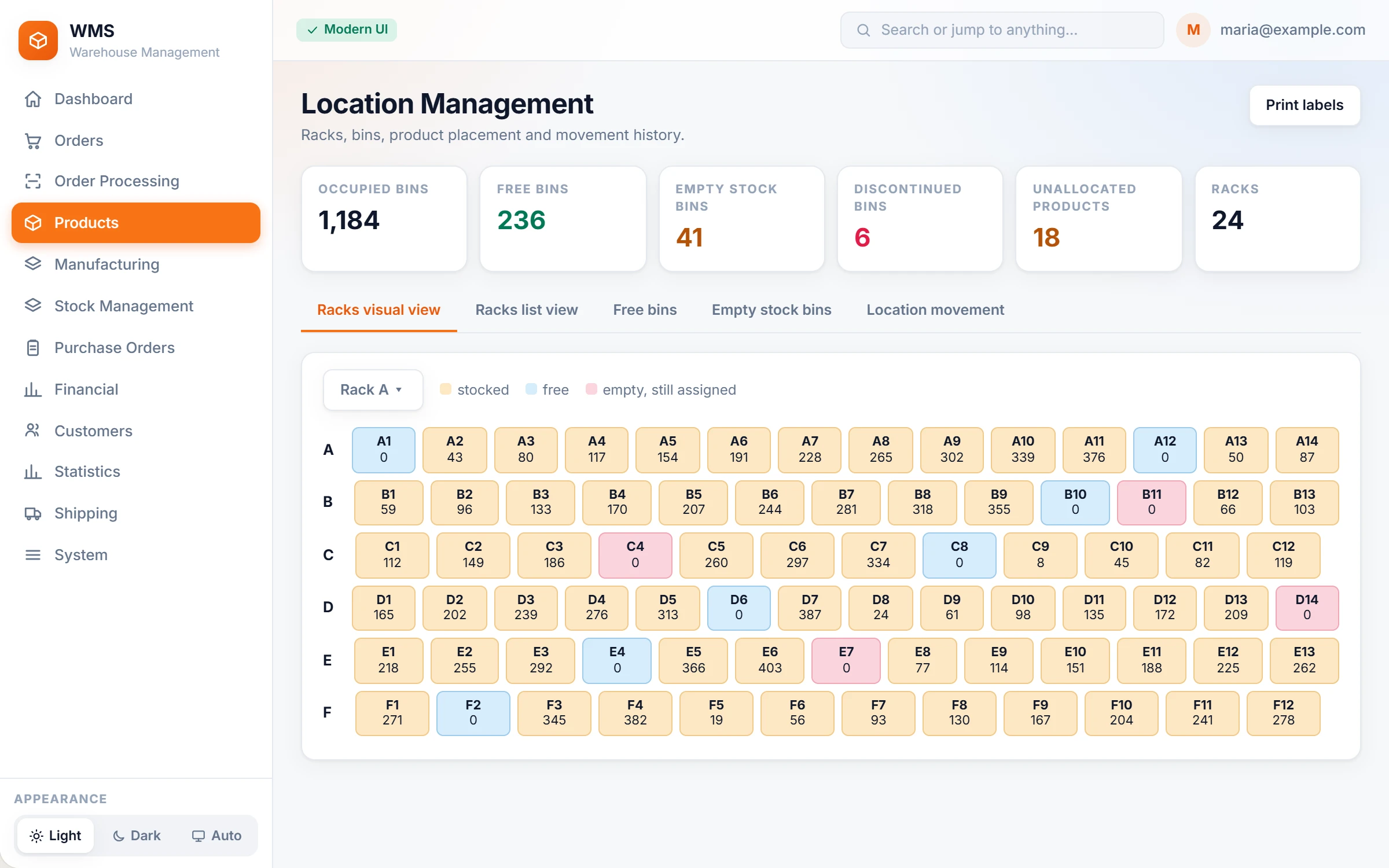
Racks and bins with QR or barcode labels, a map of what is free, full or empty, and a list of the products that still need a home.
Stock without a place is found only by whoever put it there.
New staff walk the whole warehouse to find a product. Space is lost to products that are no longer sold, and a product without a bin slows down every picking list it is on.
How it works in Pulsa
Racks and bins, your way
No more "ask the one who put it there": each location is written as levels, such as rack and bin. A product has a main bin and can have additional bins, so stock spread over two shelves is still found.
A label on every shelf
Print a QR or barcode label for a bin from the product, or for many products at once from the product list, so every shelf can be scanned instead of read and guessed.
The warehouse at a glance
Occupied bins, free bins, bins whose product is out of stock, and bins of discontinued products, each counted, without walking the aisles. The last group is usually space you can win back.
A home for every product
A product without a bin slows down every pick. Unallocated products lists everything without a location. Working through it is the quickest way to faster picking.
Find out what a loose item is
No more asking around about an item found on a table. Product lookup: scan a barcode and the product appears with its rack and bin. An unknown barcode can be attached to the right product there and then.
Everything location management does, bin by bin.
What the location pages of Pulsa really offer, from the rack map to putting a product back where it was: every product gets a place anyone can find, and empty or wasted space shows up on its own.
The rack map
Knowing what is on a shelf usually means walking there. The rack map shows every rack shelf by shelf on screen, so you see stock, gaps and wasted space from your desk.
- The warehouse in six numbersOccupied bins, free bins, empty stock bins, discontinued bins, unallocated products and racks, without a walk round. Each one opens its own list.
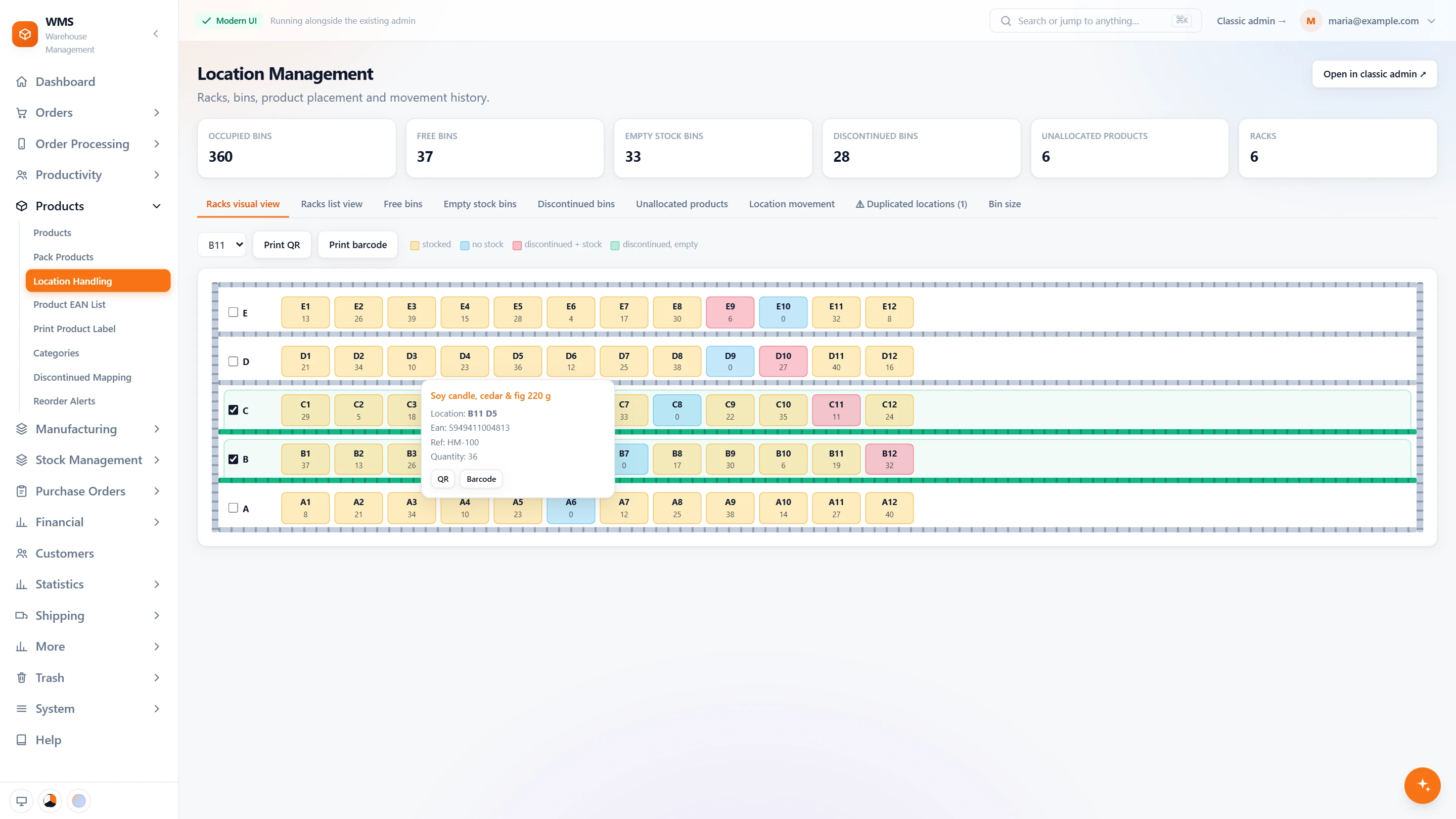
- Every rack, shelf by shelfChoose a rack and see its shelves and bins as they stand, with the quantity in each bin, without going to look.
- Colours that mean somethingStocked, no stock, discontinued with stock, discontinued and empty: each bin has its colour, so problems stand out at a glance.
- One bin at a glancePoint at a bin: its product, location, barcode, reference and quantity, with nothing to search for.
- Labels from the mapPrint QR or barcode labels for a whole rack, or for one bin from its card, so a missing label is replaced in seconds.
- Optimal picking shelvesTick the shelves that are easiest to reach. They are marked on the rack, so the easiest places are plain to see.
Free bins
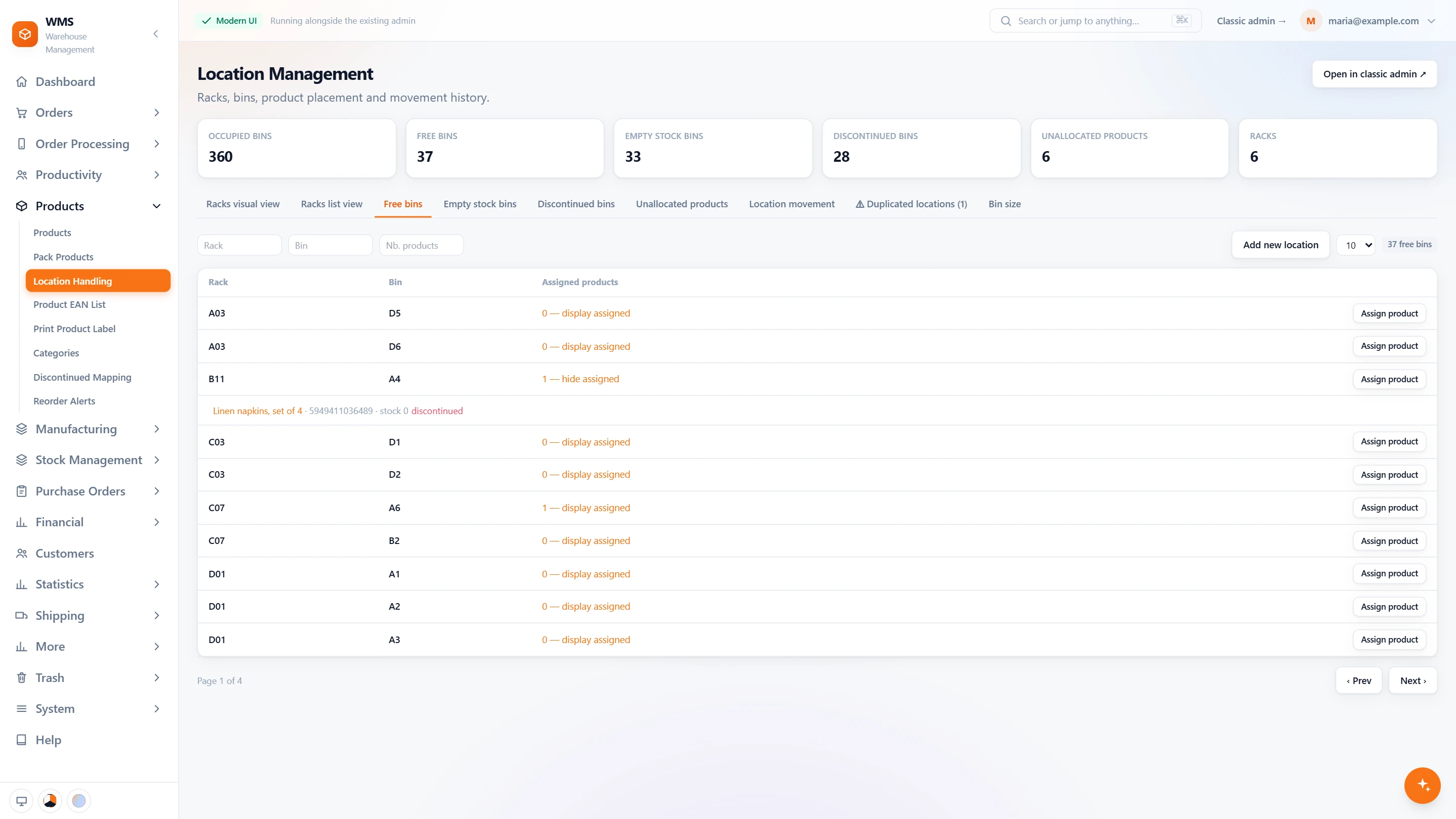
New stock often lands wherever there is a gap, and then nobody can find it. The free bins list shows where there is room, and a product gets its place in two clicks.
- Every free binA list of the bins you can use, filtered by rack, bin or number of products, so nobody walks round looking for space.
- What is assigned thereOpen a bin to see the products assigned to it, with their stock and whether they are discontinued, before you put anything new there.
- Assign a productPut an unallocated product into a free bin in two clicks. A discontinued product still there is unassigned, so the bin is clean for the new one.
- Add a new locationNew shelf? Create a new bin by filling in its levels, such as rack and bin.
A home for every product
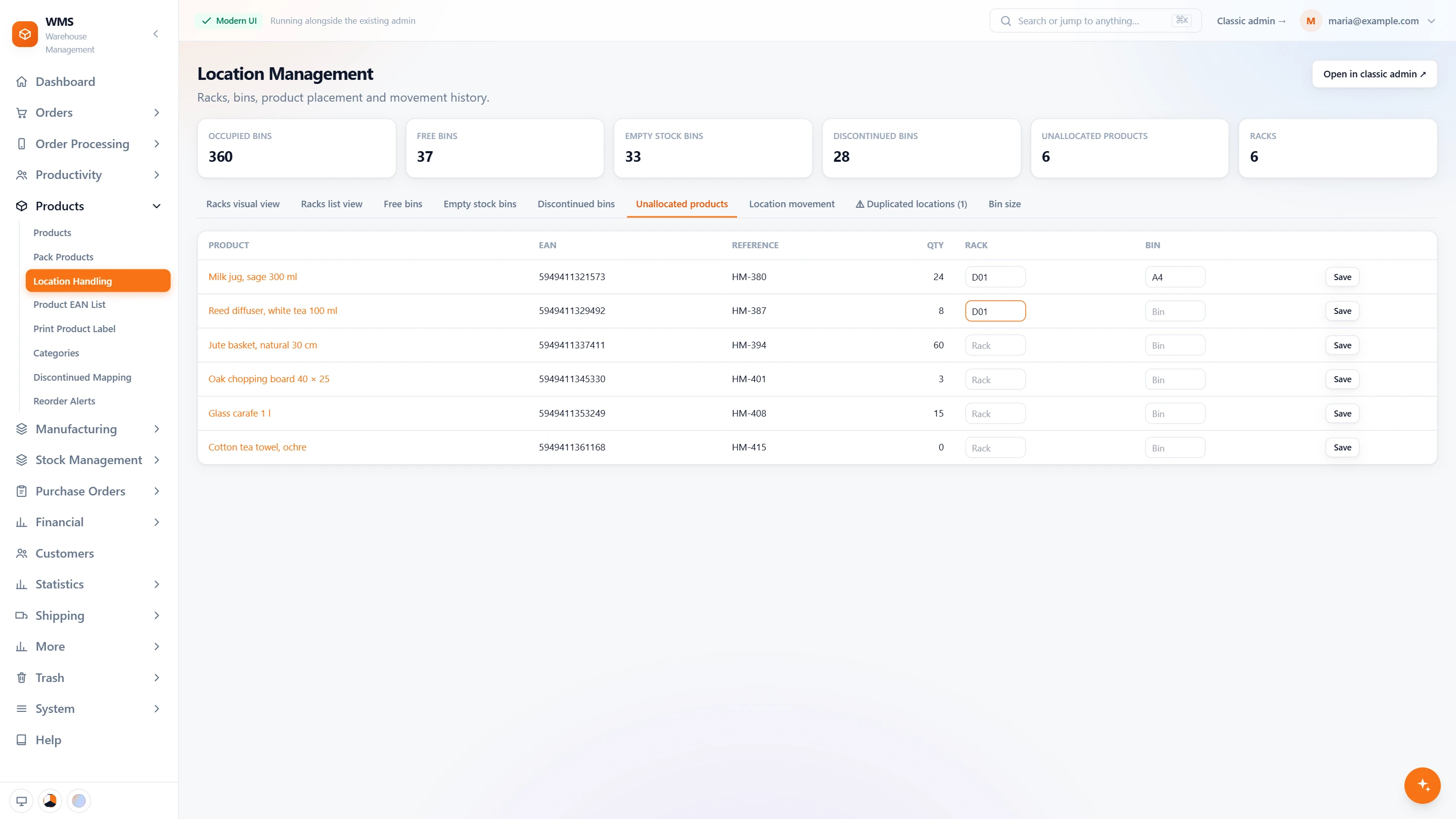
Every product without a place is one someone has to search for at every pick. This list shows them all and lets you give each one its rack and bin right there.
- Products without a placeEvery active product that has no location yet, with its barcode, reference and quantity, so none is overlooked.
- Place it on the spotType the rack and bin in the row and save. The product has its place, with no other page to open.
- Empty and discontinued binsSeparate lists of bins whose product is out of stock and bins of discontinued products: space you can win back.
- Done when the list is emptyWhen every active product has a location, the list says so, and you know the job is finished.
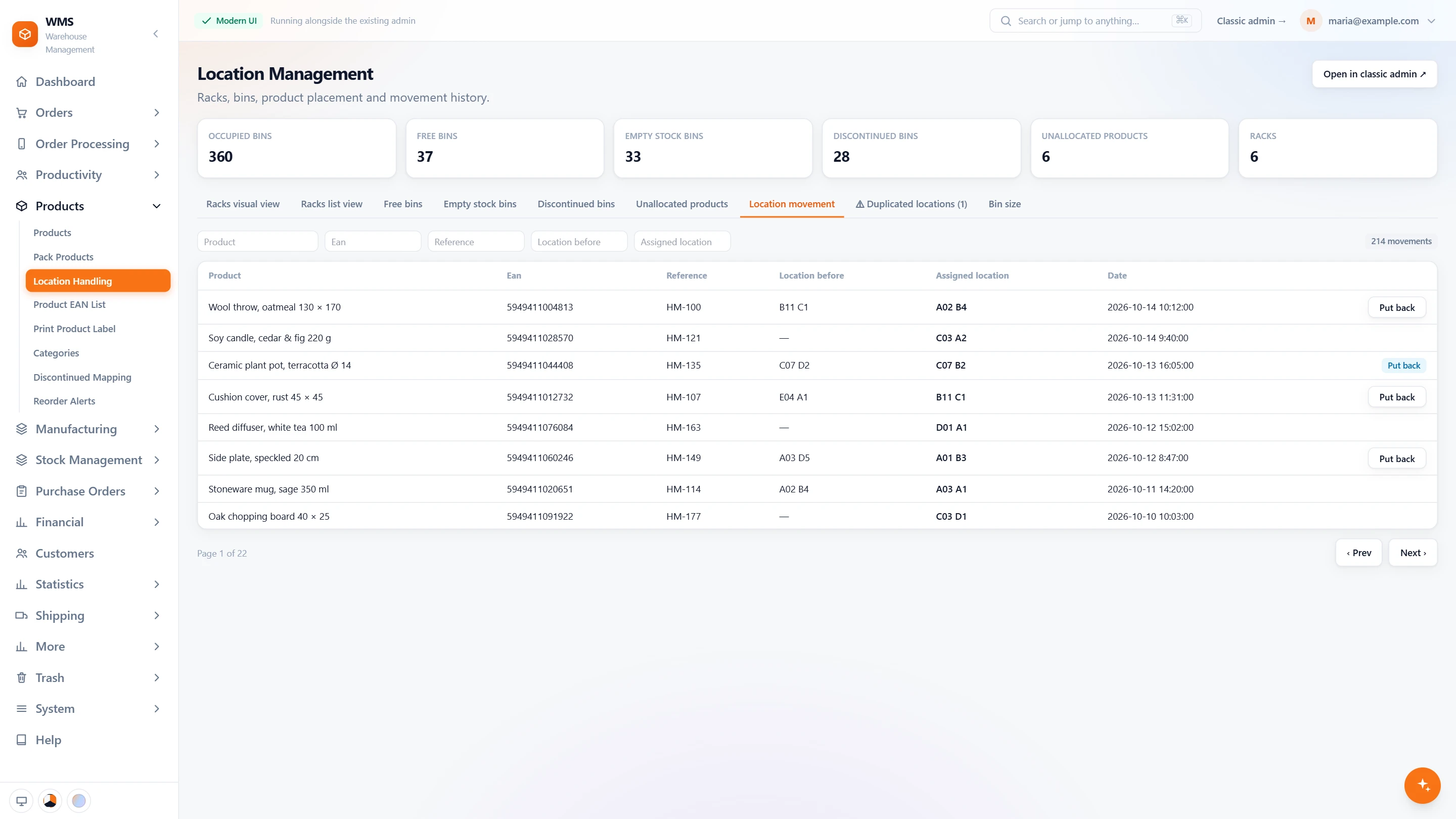
Every move on record
A product moved to another shelf without telling anyone is a product lost. Every move is kept, so you can see where something went, and a wrong move can be undone.
- Where it was, where it wentEach move of a product: the location before, the new location and the date, so nobody has to remember.
- Search the historyFilter by product, barcode, reference, old location or new location to find a move in seconds.
- Put it backMoved by mistake? Undo a move with one click. Pulsa refuses with a clear sentence when it cannot, for example when the old bin is taken.
- Marked when undoneA move that was put back stays on the list, marked, so the history stays complete.
Bin sizes
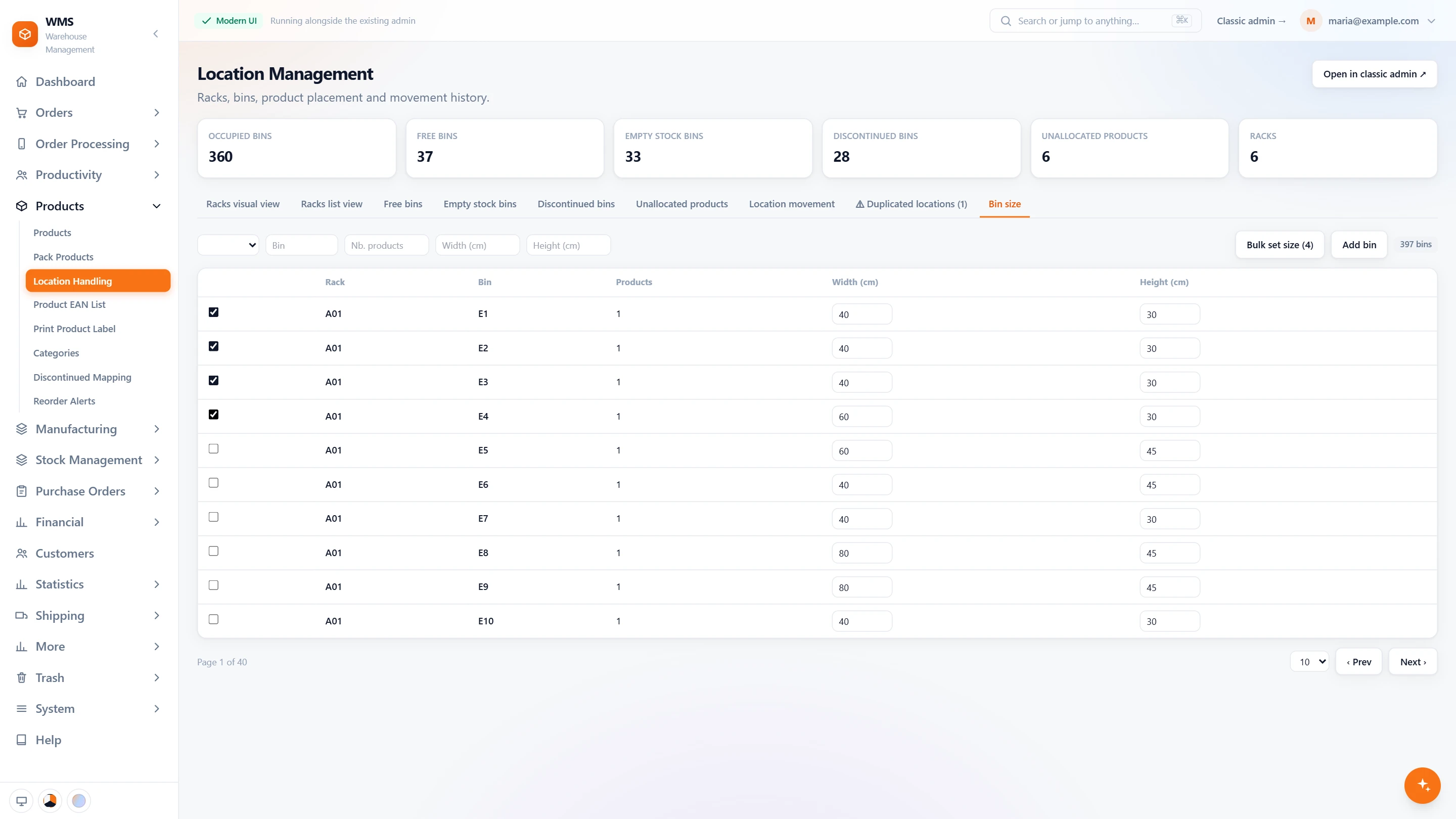
Not every product fits every bin, and finding out at the shelf wastes a trip. Recording bin sizes lets you see which bins are which without measuring again.
- Width and height per binType the size of a bin in the row; it is saved as you go, with no save button to forget.
- Many bins at onceSelect bins and set the same size for all of them, instead of one by one.
- Find the right binFilter by rack, bin, number of products, width or height, to find a bin that fits.
- Add a bin here tooCreate a new bin from the same list, without switching pages.
Labels and order
A warehouse stays findable only when names, labels and bins agree. These functions keep your own naming, print the labels and warn you before two places get mixed up.
- Your own levelsLocations are written as levels, such as rack and bin, named the way your warehouse names them, so nobody has to learn new names.
- Main and additional binsA product has a main bin and can have additional bins, so stock on two shelves is still found.
- Labels from the product listPrint location labels for one product, or for many products at once, instead of one label at a time.
- Duplicates flaggedWhen the same rack and bin appear on more than one location, a warning tab lists them, so scanning stays unambiguous.
- Racks list viewEvery occupied bin of every rack in one searchable list, with labels per bin, when a list is quicker than the map.
- Shared with stocktake and pickingSet the bins up once: the same racks and bins drive the stocktake by rack and the picking route.
What you gain
Shorter walks
No zigzagging through the aisles: picking lists are sorted by rack and bin, which only works when every product has its bin.
New staff productive on day one
The screen says where to go; nobody has to know the warehouse by heart or wait for a colleague to show them.
Space you can win back
Shelves full of products you no longer sell are easy to spot: bins of discontinued products are listed, ready to be freed for new lines.
Questions
Can one product sit in several bins?
Yes. One bin is its main bin and the others are additional bins, so overflow stock is never lost.
Do we have to renumber our shelves?
No, so your team keeps the names it already knows. You keep your own racks and bins; we enter them in Pulsa with you during setup.
Can we move a product to another bin?
Yes, from the product's page: set the new location and print its label, and the next pick goes to the new place.
Do manufacturing parts have locations too?
Yes. Parts are stocked and located just like products, so they are found the same way.
Guides
Related features
All featuresSee it with your own orders.
In the demo we connect your channels and walk you through this part of Pulsa on the real screens.