


Allegro orders, picked and shipped from your own warehouse.
One Allegro account covers Poland, Czechia, Slovakia and Hungary. Orders come in, and stock and price stay in step with your warehouse.
- 22ready-made connections: shops, marketplaces, couriers, invoicing
- 0real orders touched until you say so
- 100%of connections tried on test orders first
- 1 clickto switch it on when you are ready
Sell on Allegro without a second stock to look after.
Selling on Allegro next to your own shop usually means two stocks to watch. Orders are downloaded and typed in, stock on each offer is corrected by hand, and when something sells out in the shop the Allegro offer can keep selling it. Add more Allegro countries and the copying, checking and apologising grows with them.
With Pulsa connected, Allegro orders come into your warehouse system in the order Allegro reports them, so none is skipped. Stock is reserved straight away, your team picks and packs by scan, and stock and price on every linked offer are kept in step. To start selling new products, Pulsa builds an import file from your catalogue that creates the offers on Allegro.
One connection covers Allegro in Poland, Czechia, Slovakia and Hungary. You approve access on Allegro's own page, so your password stays with Allegro. Everything starts in Allegro's test environment, the sandbox, and moving to live loses nothing. Sending products stays off until you switch it on and name the products to try first.
More countries, the same stock
Everything the Allegro integration does.
What the Allegro connection of Pulsa really does, on its own settings page and in daily selling.
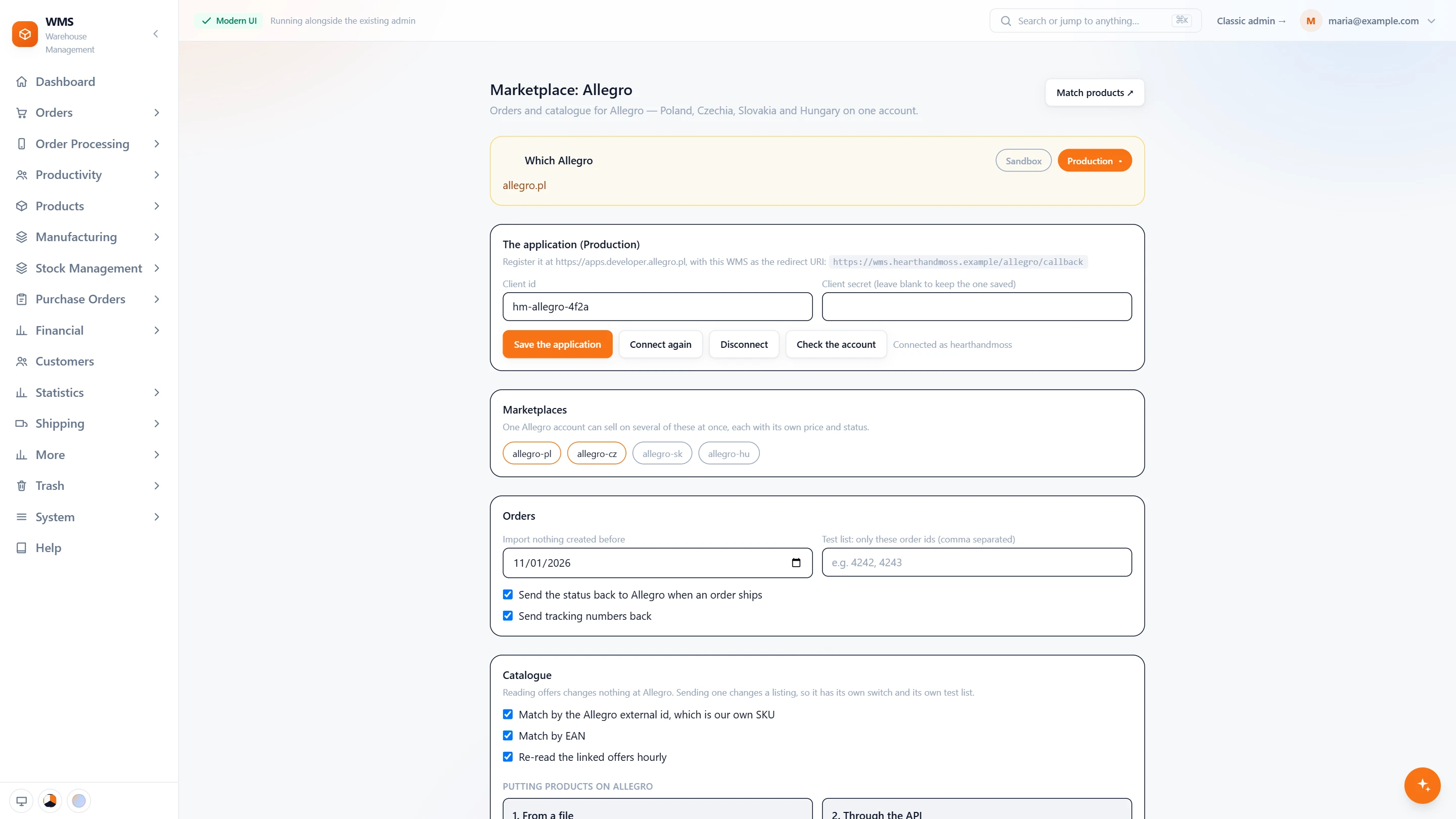
One account, four countries
- Sandbox or ProductionEach has its own application and its own settings, so trying it first loses nothing.
- Your own applicationThe client id and secret of your Allegro application; the secret is kept and never shown.
- Connect, check, disconnectConnect the account, connect it again, disconnect it, or check which account is connected.
- Several marketplacesallegro-pl, allegro-cz, allegro-sk and allegro-hu on one account, each with its own price and status.
- Orders, your wayImport nothing created before a date, try it on a test list of order ids, and send the status and tracking numbers back when an order ships.
- Catalogue matchingMatch offers by the Allegro external id, which is your own SKU, or by EAN, and re-read linked offers every hour.
- Putting products on AllegroTwo ways: from a file, or through the API.
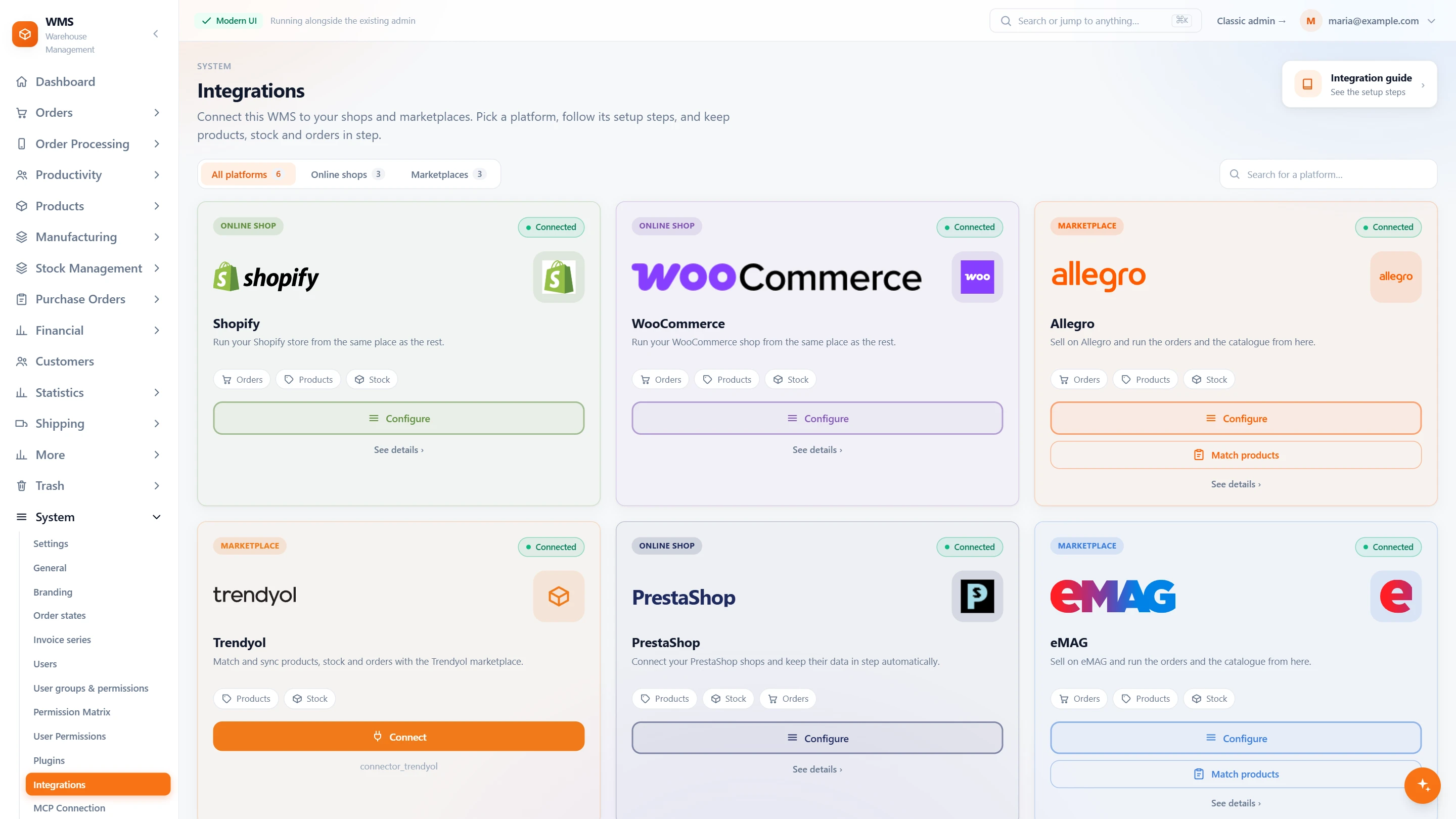
All your channels on one page
- Every shop and marketplaceSettings › Integrations lists each platform on a card, filtered by online shops or marketplaces.
- What each one syncsThe Allegro card shows what flows: orders, products and stock.
- Configure or matchFrom the card, open the settings again or go straight to matching products.
In daily selling
- No order skippedOrders are read in the order Allegro reports them, one after another.
- Stock reserved at onceThe products are set aside, so your shop and other channels cannot sell them twice.
- Stock and price in stepThe new level and price go to every offer linked to the product.
- Your password stays at AllegroYou approve access on Allegro's own page; no password is typed into Pulsa.
- Sending products starts offIt stays switched off until you turn it on and name the products to try first.
From a sale on Allegro to a parcel on its way
- 01The order arrivesPulsa reads the new Allegro order in, in the order Allegro reports it.
- 02Stock is reservedThe products are set aside so your shop and other channels cannot sell them twice.
- 03Picked by scanA picking list sorted by rack and bin leads your team through the warehouse, and every item is scanned.
- 04Packed and labelledThe parcel is checked by scan and the courier label is printed.
- 05Allegro is updatedThe new stock level and price go to every offer linked to the product.
What moves between Allegro and your warehouse
Setting up Allegro with Pulsa
- 01Approve access at Allegro
You sign in on Allegro's own page and approve access. No password is ever typed into Pulsa.
- 02Tried in Allegro's sandbox
The connection starts in Allegro's test environment; moving to the live one loses nothing.
- 03Offers matched
Allegro returns your SKU on every offer, so most products link themselves; the rest by EAN or by hand.
- 04Switched on
Sending products to Allegro stays off until you turn it on and name the products to try first.
- An Allegro seller account
- An SKU or EAN on each product
We set it up with you during onboarding, and every connection starts switched off until it has been tested.





Questions about Allegro
What does the Allegro integration actually do?
It brings your Allegro orders into Pulsa, keeps stock and price in step on every offer linked to a product, and can create new offers from your catalogue with an import file.
Do I need a separate connection for each country?
No. One Allegro account covers Poland, Czechia, Slovakia and Hungary; the marketplaces are listed inside that one connection.
Does Pulsa need my Allegro password?
No. You approve access on Allegro's own page, so your password stays with Allegro.
Can I test it before it touches my live offers?
Yes. The connection starts in Allegro's sandbox, a test environment, and the live connection keeps its own settings, so switching loses nothing. Sending products stays off until you name the products to try first.
Can Pulsa list my products on Allegro?
Yes. Pulsa builds an import file from your products, with EAN, reference, name, stock, price, pictures and category, to create the offers; after that, stock and price are kept in step through the connection.
My products are already on Allegro. Do I have to start again?
No. Your existing offers are matched to your products by SKU, by EAN or by hand, and from then on their stock and price follow your warehouse.