
Deliveries counted by scan and put away to a bin.
Goods are booked in against their purchase order with the scanner. Every difference is shown before anything is saved, and the put-away screen follows every unit until it sits in a bin.
Goods on the floor that nobody can sell.
The delivery note is ticked off by hand and the stock is typed in later. Boxes wait by the door because nobody knows they have not been put away, and a short delivery is noticed weeks later, when it is too late to claim it.
How it works in Pulsa
Start from the right order
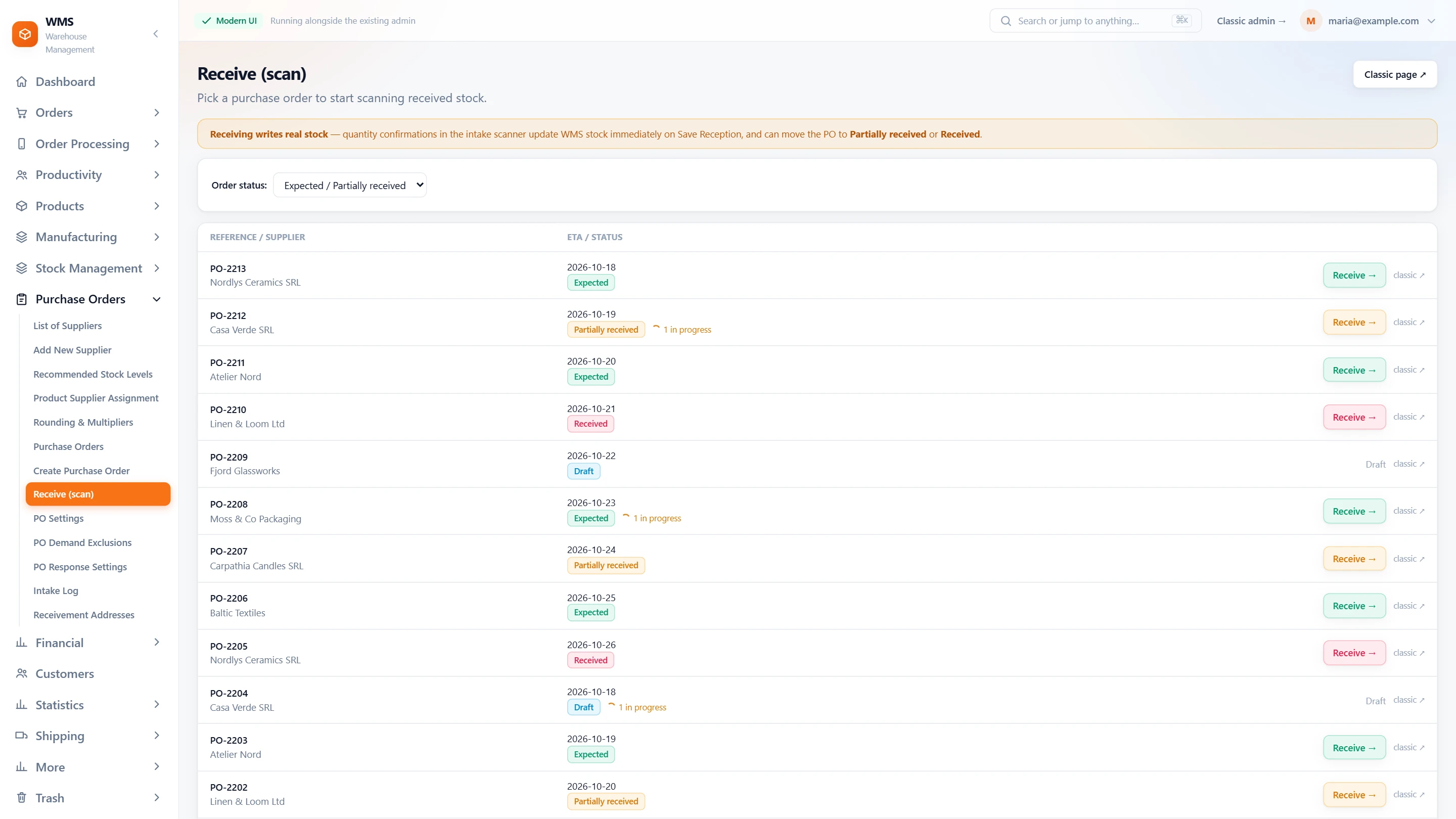
No more hunting through old orders: the list opens on the ones goods can still arrive for, Expected and Partially received. An order someone has already started receiving is marked, so two people do not receive the same delivery twice.
Scan instead of ticking off
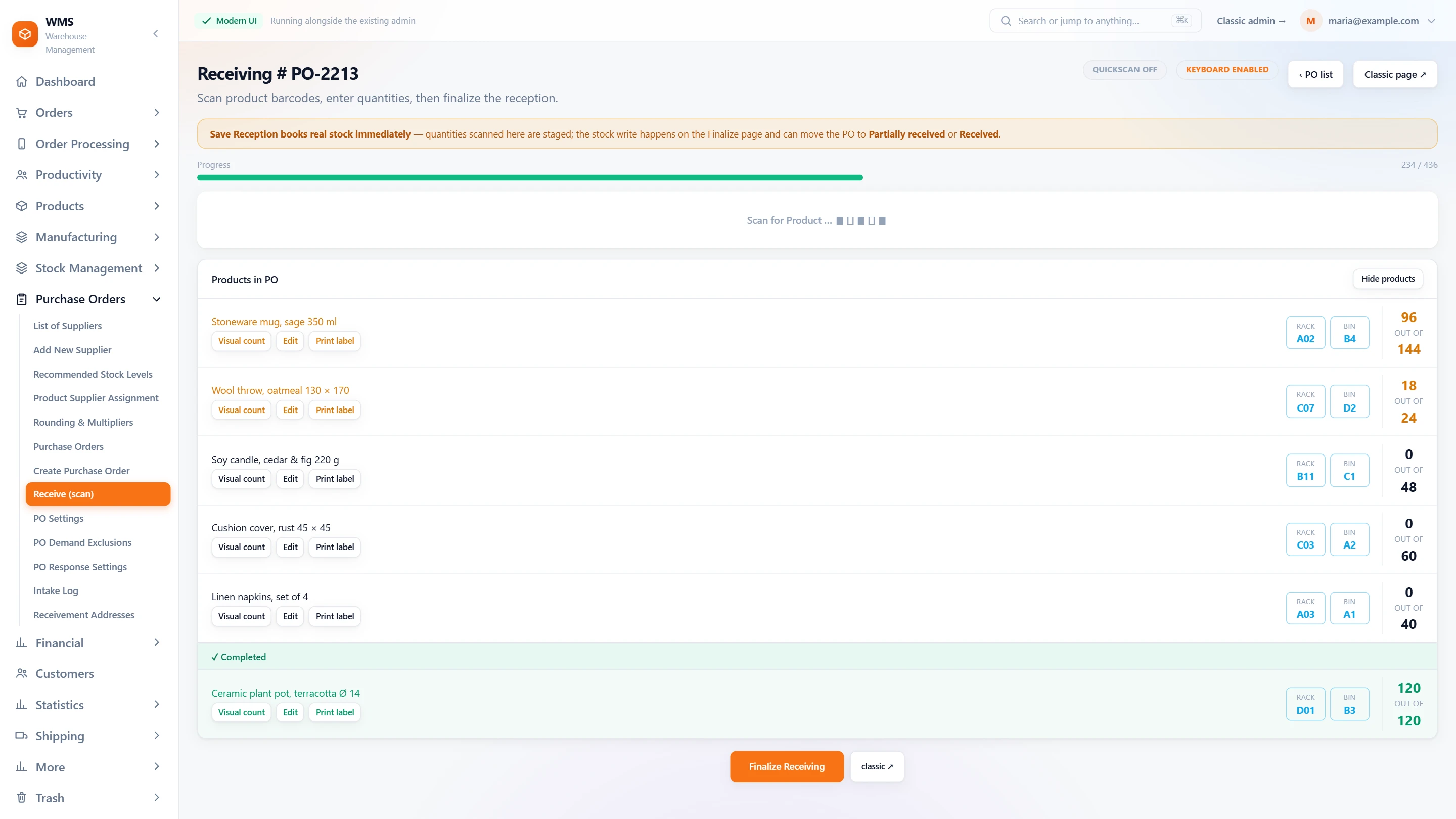
Scan each product, or a box barcode for the whole box, instead of ticking lines on paper. The screen shows how many you are receiving against how many are expected. A product that is not on the order is refused, and more than expected is flagged, so mistakes are caught at the door, not weeks later.
See the differences, then save
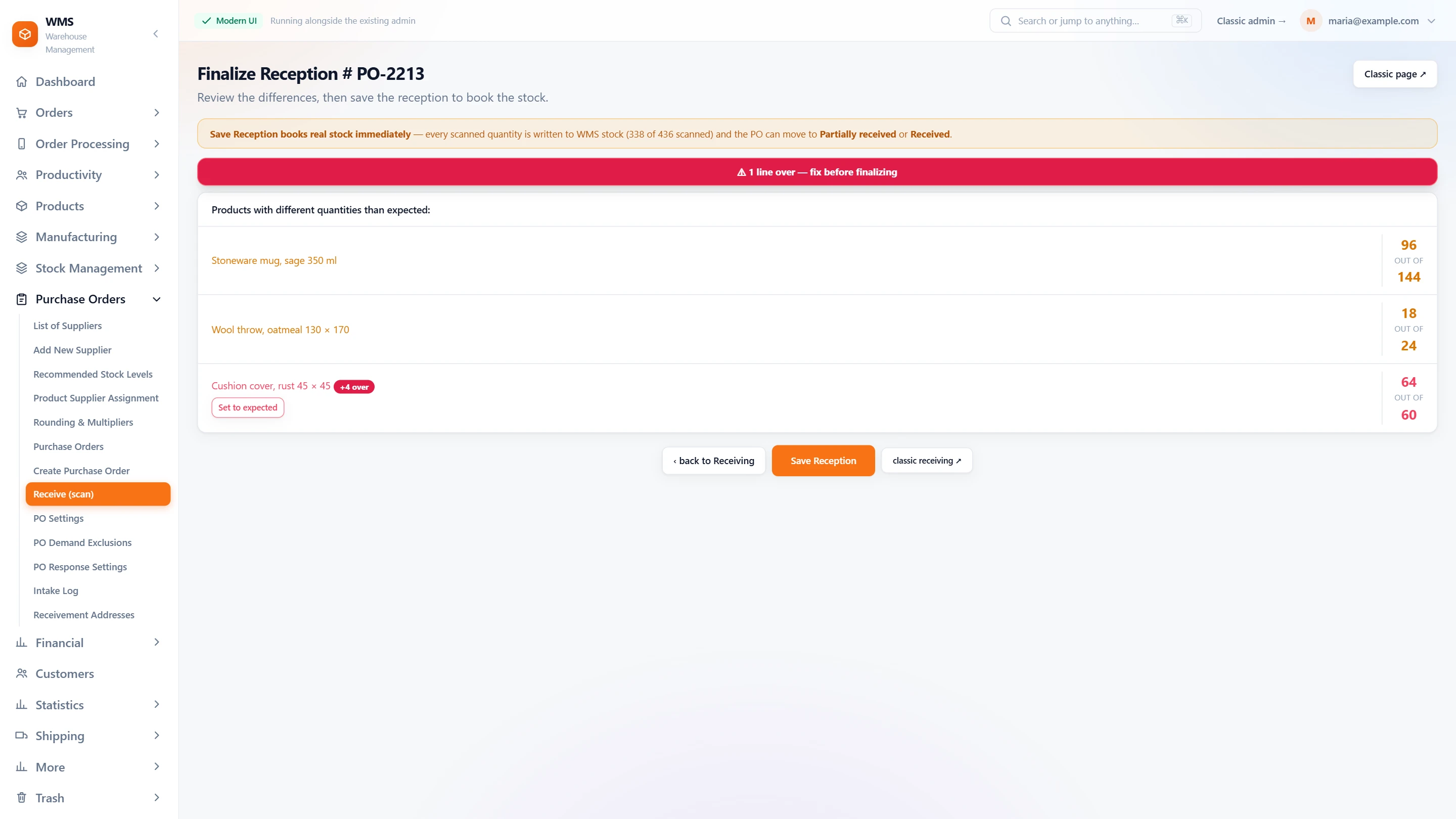
Before anything is booked, Finalize lists every line that differs from the order, so a short delivery is seen right away, not weeks later. Save reception books it: the stock goes up and the order becomes Partially received, or Received once everything is in.
Every box on its shelf
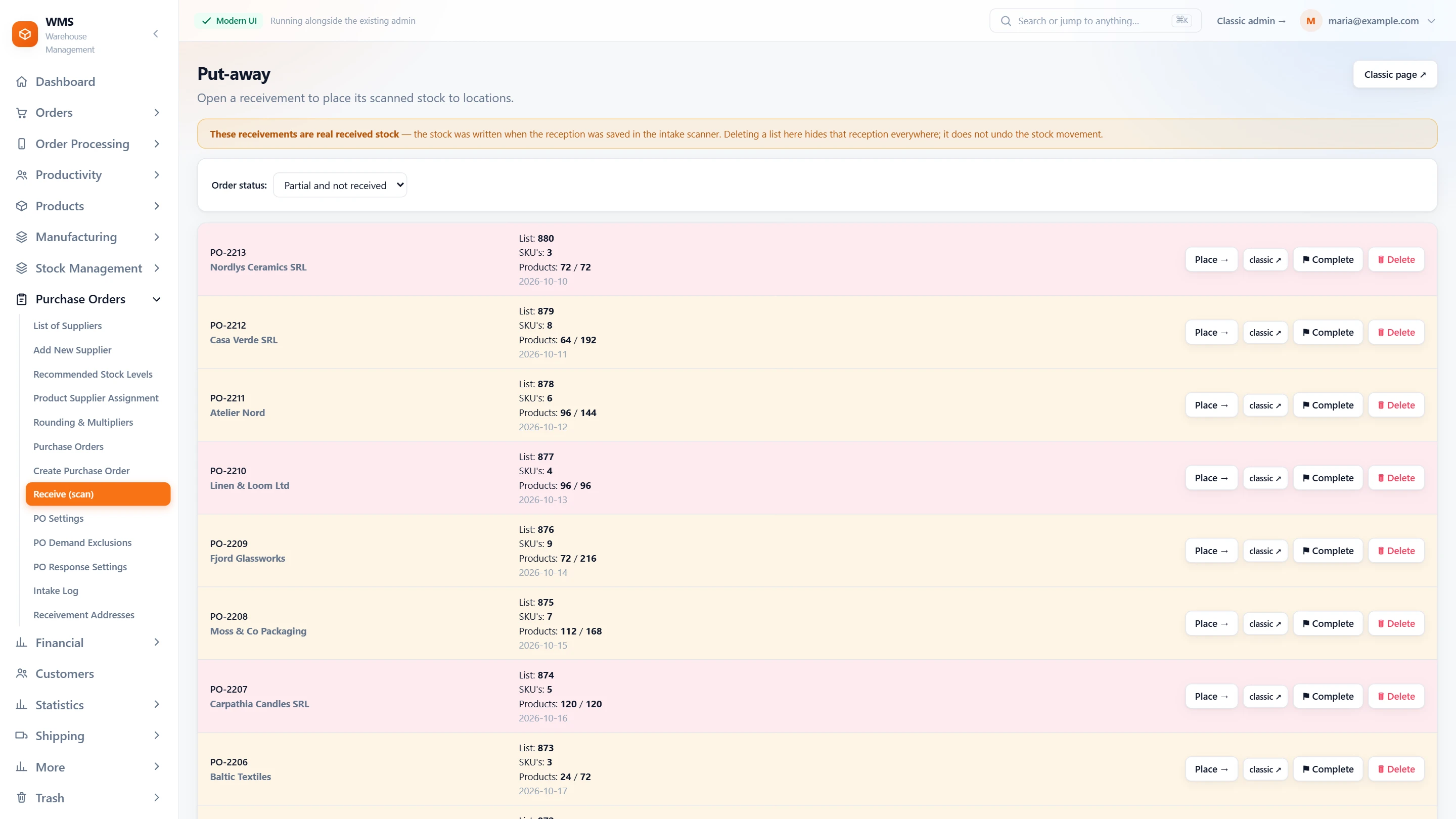
Scan the product, then the bin. The put-away screen shows how far each delivery has got, for example 0 of 250 units placed, so nothing is forgotten by the door. A wrong bin is refused on the spot, before the product gets lost on the wrong shelf.
Answers when the supplier asks
When a quantity is questioned, the intake log has the answer: the product, the person, the company, the quantity, the EAN, the invoice number and the time of each booking.
Everything receiving does, from the delivery to the shelf.
What the receiving pages of Pulsa really offer, from the purchase order to the location: each part takes away a step that is usually done on paper, typed twice or forgotten. What depends on a setting says so.
Start from the right order
When a truck arrives, the first question is which order it belongs to. Pulsa puts the orders that are due first, so receiving starts in seconds instead of a search.
- The orders that are dueNo digging through old orders: expected and partially received purchase orders come first, each with its supplier and expected date.
- Status at a glanceExpected, partially received, received or draft, and how many receptions are still in progress, so nobody has to ask around.
- Straight to scanningOne button opens the order in the receiving scanner, with nothing to look up first.
- Filter by statusShow only one status, or every order, to find the one you need quickly.
Scan it in, no ticking off
Ticking a delivery note by hand misses things and has to be typed in again later. Scanning records what arrived as it comes out of the box, and shows at once what is still missing.
- Scan each productScan the product barcode and type the quantity, or let each scan count one, with no list to tick off.
- Whole boxes in one scanNo counting units one by one: a box barcode counts the whole box at once, with the number of units you set for it.
- Count by hand when neededA visual count, an edit mode for a quantity, or set a line straight to what was ordered, for goods that are easier to count by eye.
- Where it goesEach product shows its rack and bin, so it can go straight to its place instead of waiting by the door.
- Too many arrivedExtra units are not added by accident: when a line is already complete, Pulsa asks before adding more: add them, keep the extra, or remove it.
- Product labelsWhen switched on, print a product's label right from the line, with a template kept for every next print, so nothing has to be typed again.
Check, then book
A short or over delivery noticed weeks later is hard to claim. Pulsa shows every difference before the stock is booked, so you decide with the facts in front of you.
- Differences firstBefore saving, every product whose quantity differs from the order is listed, so a missing line is seen right away.
- Over is stoppedToo much stock is not booked by mistake: a line over the ordered quantity has to be fixed first, or set to the expected quantity in one tap.
- Stock is bookedSaving the reception writes the stock and moves the purchase order to partially received or received, with nothing to type in afterwards.
- Nothing booked earlyQuantities scanned are only staged until the reception is saved, so a wrong scan never reaches the stock.
Every box on its shelf
Goods that are received but not put away cannot be picked, and nobody notices. Put-away shows what is still waiting and checks that each product lands in the right place.
- Every reception listedEach saved reception with its purchase order, supplier, number of products and how many are placed, so you see what is still by the door.
- Place by scanOpen a reception and scan each product into its location; a wrong location is refused, so nothing gets lost on the wrong shelf.
- Finish or removeMark a reception complete when it is put away, or remove a list that was made by mistake, so the list stays clean.
- Partial or allShow only the receptions still to place, so the work left is the first thing you see, or all of them.
Set it up your way
Every warehouse receives a little differently. These settings fit the screens to the way your team already works, instead of the other way round.
- Receive and place in one goWhen switched on, each product is placed to its location during receiving, saving a second walk.
- Quick scanEach scan confirmed at once with the default quantity, with no extra tap.
- Keyboard modeThe default is set once for the warehouse, and can be switched on the screen when someone prefers to type.
- Product change warningA warning when the scanned product changes in the middle of a count, so two products are not mixed up.
- Intake logEvery receiving scan is kept in its own log, so a question about a delivery can be answered later.
- Receivement addressesThe addresses deliveries are received at, kept together in one list, easy to find and keep up to date.
What you gain
Stock right the day goods arrive
No typing in later: the stock figure goes up when the delivery is saved, and the shops are told, so new goods can be sold the same day.
Nothing waits unseen
Until a unit is in a bin it shows as outstanding put-away work, so goods do not stay unpickable by the door while customers wait for them.
Short deliveries found at once
Ordered against received, line by line, shows exactly what the supplier still owes you, while it is still easy to claim.
Connected to the shops, marketplaces and couriers you already use.
Questions
Can a delivery arrive in several parts?
Yes. Each part is received when it arrives, with nothing to keep track of on paper; the order stays Partially received until the last unit is in.
Does scanning change the stock straight away?
No, so a wrong scan never reaches your shops. Scanning only records what arrived. The stock changes when the reception is saved, after you have seen the differences.
What about products that arrive without a barcode?
Print an EAN label for them in Pulsa and stick it on, so they can be scanned from then on instead of being typed by hand every time.
Do parts for manufacturing come in the same way?
Yes, so the team learns one way of working. Part purchase orders are received with the scanner the same way, then put away to their own locations.
Related features
All featuresSee it with your own orders.
In the demo we connect your channels and walk you through this part of Pulsa on the real screens.