


Sameday AWBs, created as the order is packed.
Pulsa creates the Sameday AWB, the courier's shipping document, for one or several parcels, with cash on delivery, and prints the label in A4 or A6. If you prefer, the AWB is created by itself when an order reaches the status you choose.
- 100%of items scanned before the label is printed
- 1screen to pack the parcel and print its label
- 13+couriers, all with the same print buttons
- 0labels retyped on the courier's own website
Stop typing addresses into the Sameday website.
Without an integration, every Sameday parcel means the same routine: open the order, copy the name, address, phone number and cash on delivery amount into Sameday, print the AWB, then find the right box for the label. On a busy day it is easy to mistype a digit, forget the amount to collect or put a label on the wrong parcel, and each slip ends in a return or a phone call.
With Sameday connected, the AWB becomes part of packing. Your team picks the order by scan and checks it by scan at the packing table, and Pulsa creates the Sameday AWB with the delivery details and the cash on delivery already on it. The label comes out as a PDF in A4 or A6, the tracking link stays on the order, and an AWB can be cancelled from the orders list if plans change.
Your Sameday contract, prices and pickups stay exactly as they are; Pulsa only uses your account to create the AWBs. It is made for shops and warehouses in Romania that ship with Sameday, alone or next to other couriers. Nothing is sent until you switch it on, and the whole flow can be tried in Sameday's demo environment first.
Less typing, fewer wrong labels, faster dispatch
Everything the Sameday integration does.
What the Sameday plugin of Pulsa really does, on its own settings page and in daily shipping.
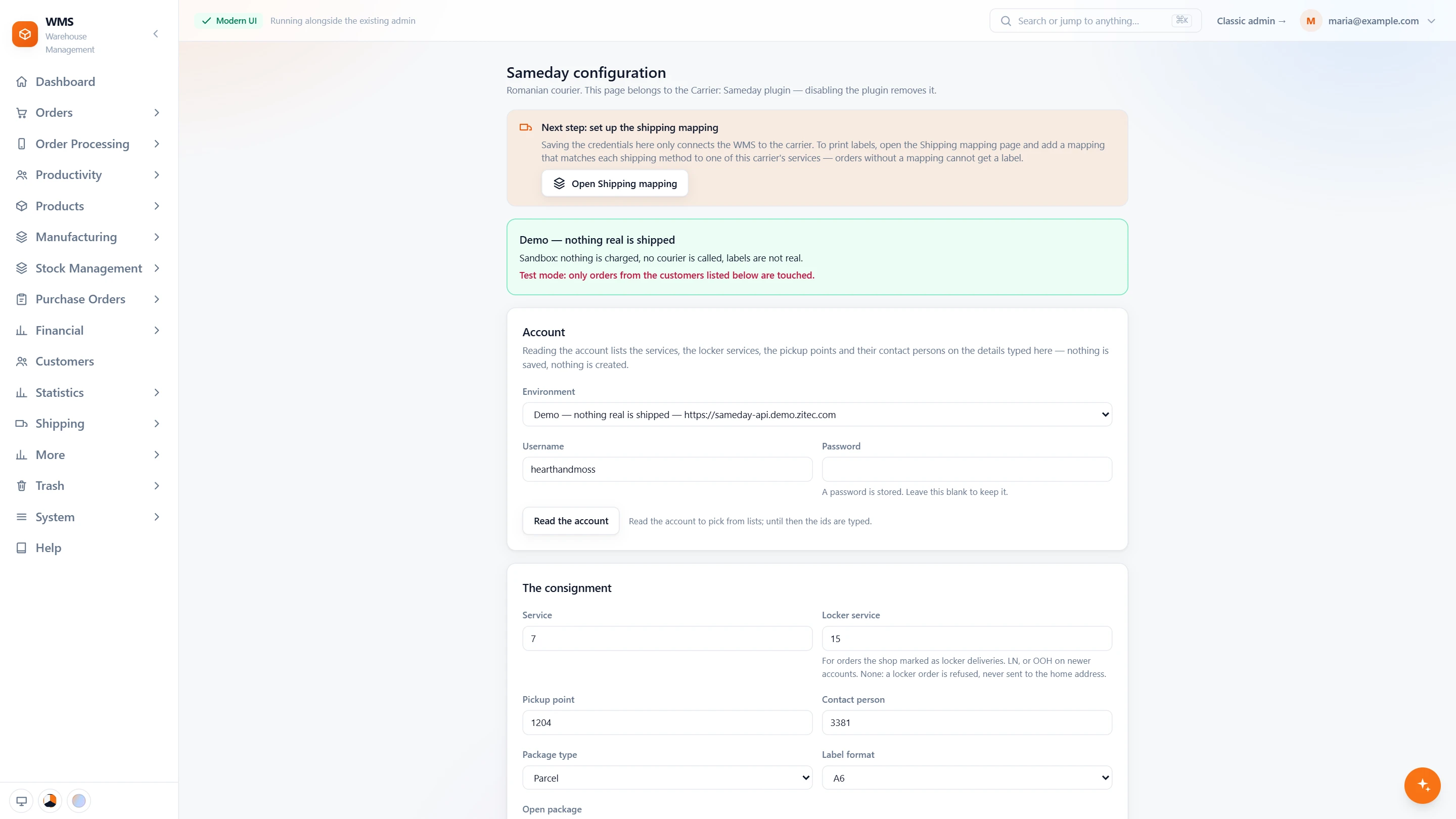
Connect your Sameday account
- Demo first, live when readyChoose Sameday's demo environment, where nothing is charged and no courier comes, or live. The page says in one sentence which one it is.
- Your own accountYour Sameday username and password; the password is never shown again, only whether one is stored.
- Read the accountOne click lists your services, locker services, pickup points and contact persons, so you pick from lists instead of typing numbers. Nothing is saved or created.
- The consignmentThe service, the pickup point, the package type and the label format, A6 or A4.
- Then the shipping mappingThe page reminds you of the last step: link each shipping method of your shop to a Sameday service.
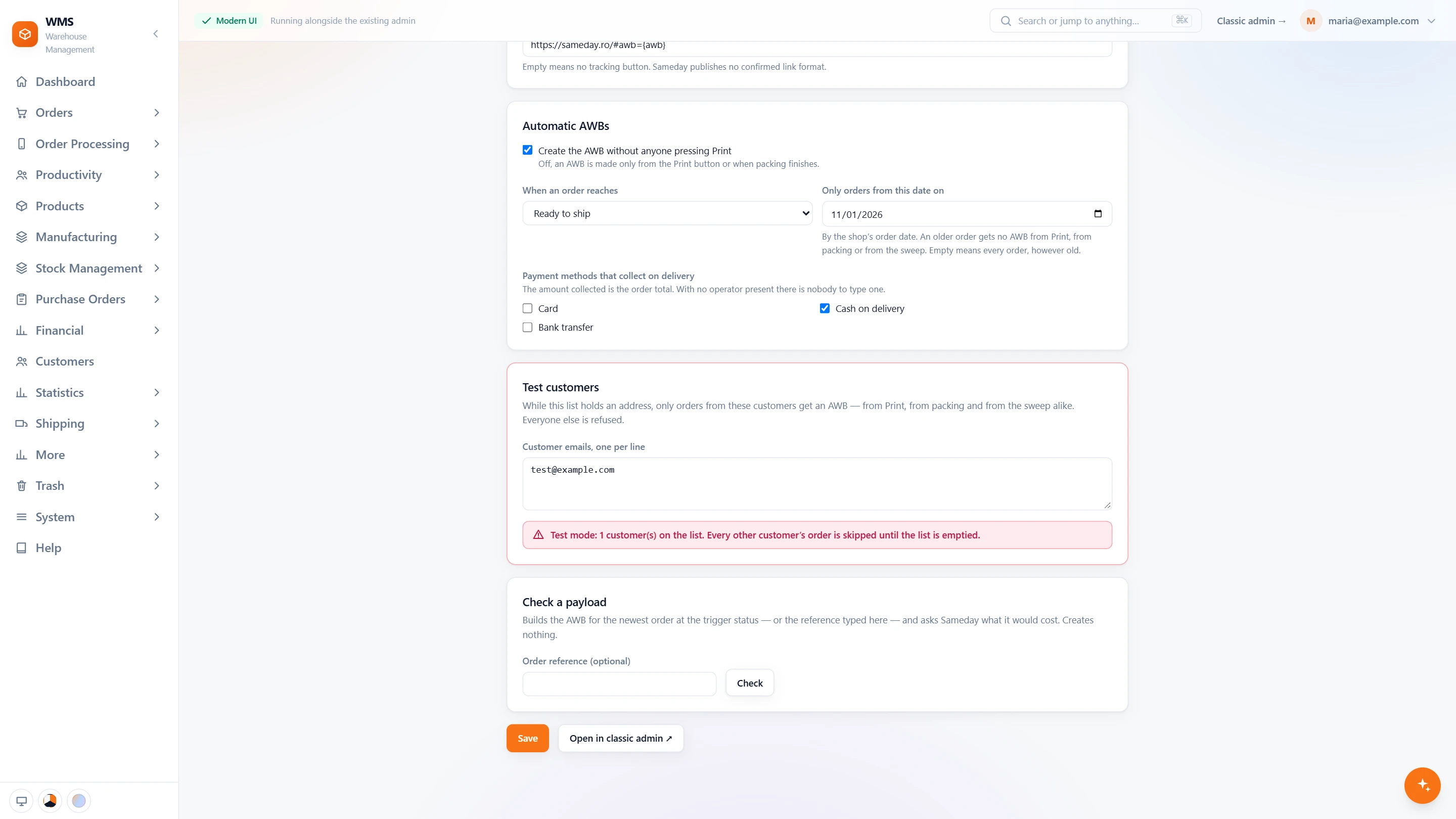
AWBs without anyone pressing Print
- At the status you chooseSwitch it on, pick an order status, and the AWB is created for every order that reaches it.
- Cash on delivery, tickedTick the payment methods that mean cash on delivery; the order total is the amount to collect.
- Only orders from a date onOlder orders never get an AWB, whichever way it is asked for.
- Test customersWhile the list holds an address, only those customers' orders get an AWB, everyone else is refused.
- Check a payloadAsk Sameday what an order's AWB would cost, through the same code that prints it, without creating anything.
In daily shipping
- Three ways to an AWBPrint from the orders list or the picking list, when packing finishes, or automatically at a status.
- Never two AWBs for one orderBefore creating, Pulsa asks Sameday whether the order already has one, and reuses it.
- LockersAn order the shop marked for a Sameday locker goes on the locker service, never to the home address.
- Addresses Sameday understandsCounty and city are matched to Sameday's own list; an address it does not know is refused with a sentence that names it.
- Cancel and trackCancel an AWB from the orders list, and keep the tracking link on the order.
From a new order to a parcel with Sameday
- 01The order arrivesFrom your shop or marketplace, with the delivery option the customer chose.
- 02Picked by scanA picking list sorted by rack and bin leads your team through the warehouse, and every item is scanned.
- 03Packed and checkedEach item is scanned again at the packing table, so the box holds exactly what was ordered.
- 04AWB and labelPulsa creates the Sameday AWB with the parcels and the cash on delivery, and the label prints in A4 or A6.
- 05Handed to SamedayThe parcel waits for the courier, and its tracking link stays on the order in Pulsa.
What moves between Sameday and your warehouse
Setting up Sameday with Pulsa
- 01Your Sameday account
Add your Sameday API credentials, the login Sameday gives you for connected software.
- 02Tried in Sameday's demo
Sameday has a demo environment, so everything is proven before a live account is touched.
- 03Delivery options mapped
Each delivery option in your shops gets its Sameday service.
- 04Automatic, if you want it
Choose the status that creates the AWB by itself; it starts switched off.
- A Sameday business account with API access
- A label printer for A6, or plain A4 paper
We set it up with you during onboarding, and every connection starts switched off until it has been tested.





Questions about Sameday
What does the Sameday integration do?
It creates Sameday AWBs from your orders in Pulsa, for one or several parcels and with cash on delivery, and prints the label in A4 or A6. It also keeps the tracking link on the order and lets you cancel an AWB from the orders list.
Can I collect cash on delivery?
Yes. The amount goes on the AWB.
Can the AWB be created without anyone clicking?
Yes. Choose an order status, and the AWB is created as soon as an order reaches it. This starts switched off, so you decide when.
Can I try it before going live?
Yes. Sameday's demo environment lets us prove the whole flow without your live account.
Do I need a developer to set it up?
No. You add your Sameday API credentials and choose which Sameday service each delivery option uses. Nothing has to be programmed.
Can I ship with Sameday and other couriers?
Yes. Each delivery option in your shops is mapped to a courier service, so Sameday can carry some orders while another courier connected to Pulsa carries others.