


SmartBill invoices, issued as orders move.
An invoice for each order, from a button or automatically at the status you choose. Pulsa keeps its series, number and link on the order and follows it afterwards: cancelled, emailed, paid.
- 0orders copied into invoices by hand
- 1invoice per order, at the status or moment you choose
- 100%of invoices lead back to their order
- 3invoicing tools: SmartBill, FGO and Xero
Stop retyping orders into SmartBill.
Without a link between the warehouse and SmartBill, someone has to open each shipped order, copy the customer, the products and the prices into a new invoice, and then note the invoice number somewhere. It is slow work, it is easy to pick the wrong series or miss an order, and when an order is cancelled later, its invoice often stays open until someone spots it at the end of the month.
With Pulsa connected, the invoice is issued from the order itself: with one button, or automatically when the order reaches a status you choose. Private buyers and companies can go to separate series. The series, number and link are saved on the order, so anyone can find the invoice. If the order is cancelled, the invoice can be cancelled in SmartBill too. Pulsa can also email it through SmartBill, record a payment you took and learn when a bank transfer has paid it.
SmartBill stays your invoicing system, with your own series, and your accountant keeps working in it as before. Pulsa only fills it in from your orders, for the shops you choose. The integration is made for Romanian businesses on SmartBill Cloud, and it starts in a dry run, so you see exactly what would be sent before a single real invoice is issued.
Less typing, cleaner invoicing
Everything the SmartBill integration does.
What the SmartBill plugin of Pulsa really does, on its own settings page and in daily invoicing.
Connect your SmartBill account
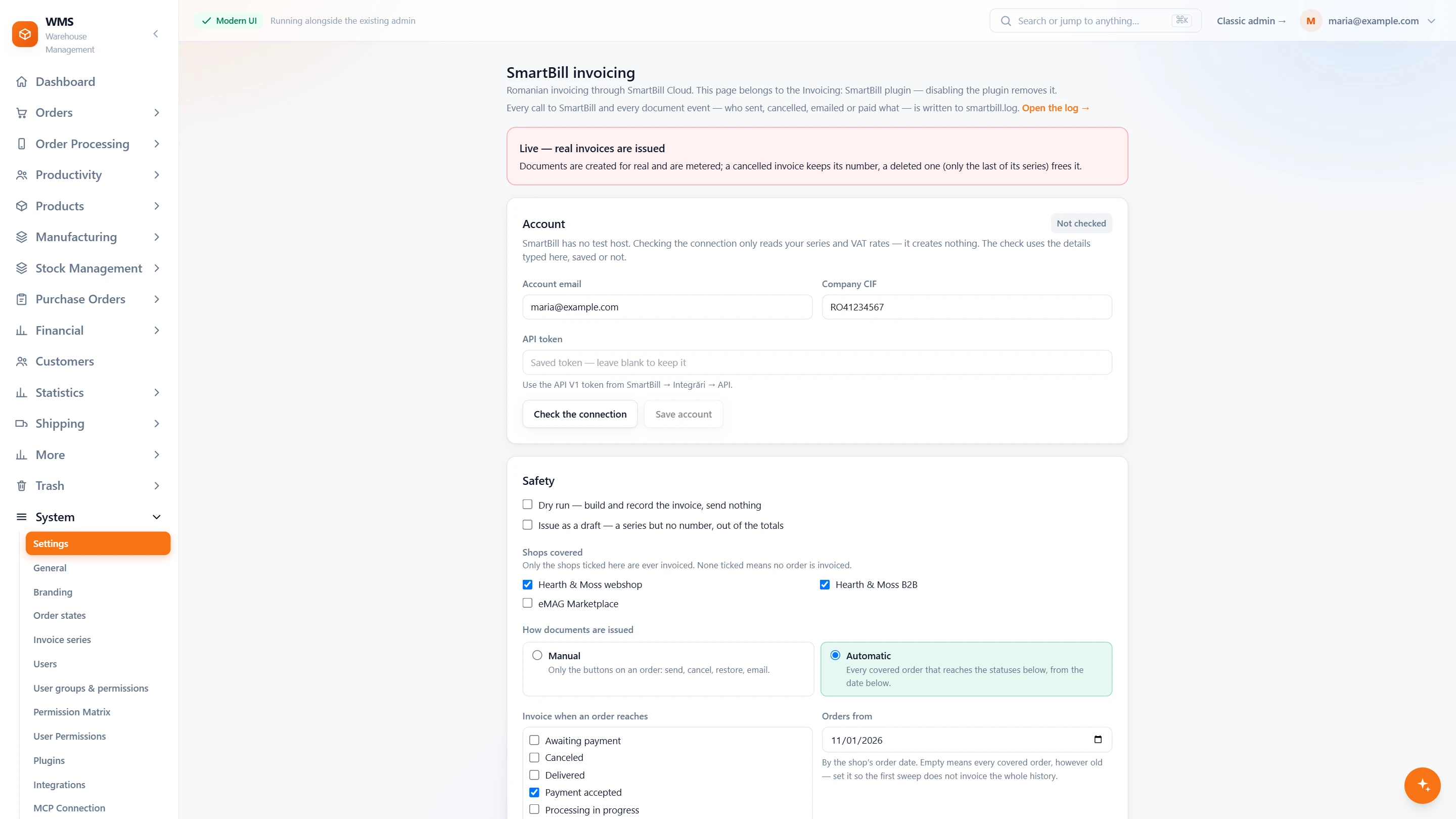
- Live means real invoicesThe page says it plainly: in live mode documents are created for real.
- Your own accountYour SmartBill account email, your company CIF and the API token; the token is kept and never shown.
- Check the connectionIt reads your series and VAT rates and creates nothing.
- Safety firstA dry run builds and records the invoice and sends nothing; issuing as a draft keeps it out of the totals.
- Only the shops you tickChoose which shops are invoiced; none ticked means no order is invoiced.
- Manual or automaticButtons on the order to send, cancel, restore and email, or automatic at the statuses you choose, from a date on.
- Every call loggedEach call to SmartBill, who sent, cancelled, emailed or paid what, is written to a log you can open.
Invoices without anyone pressing a button
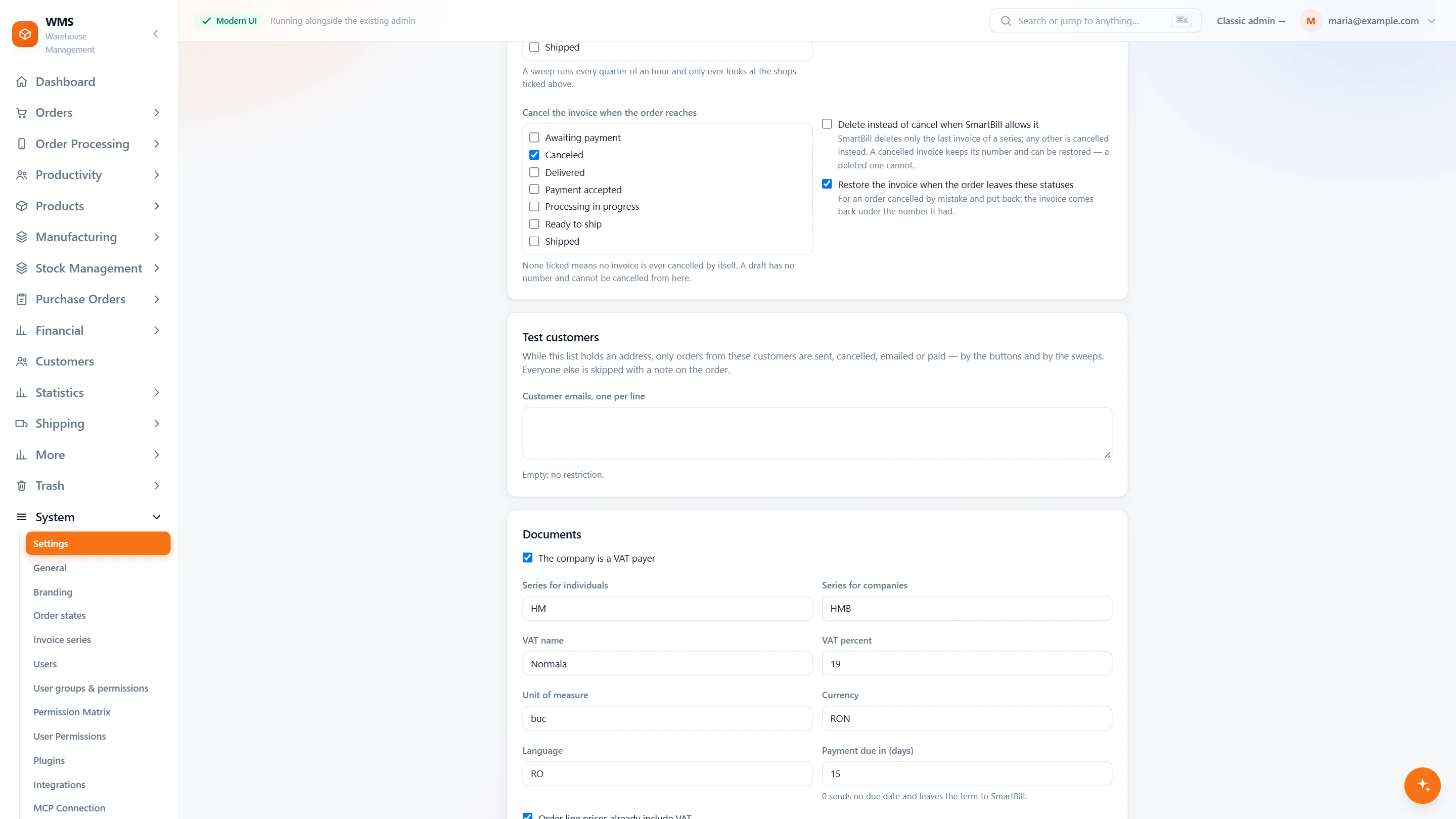
- The statuses you chooseTick the order statuses that issue an invoice, and the ones that cancel it.
- Payments recordedPayments are recorded on the invoice by payment method.
- The right seriesOne series for private buyers and one for companies.
- The invoice detailsVAT, currency and the days until payment is due.
- Sent and countedThe invoice can be emailed to the customer, and stock can be used in SmartBill.
In daily invoicing
- Easy to findThe invoice's series, number and link are saved on the order.
- Never twiceAn order that already has a SmartBill invoice gets that invoice back instead of a new one.
- Cancelled orders tidied upThe invoice is cancelled in SmartBill, or deleted when it is the last of its series.
- Bank transfers noticedPulsa learns when a bank transfer has paid the invoice.
- Your own orders firstA test list of customer emails limits the live account to your own orders.
From a shipped order to a paid invoice
- 01The order reaches your statusFor example Shipped. You choose which statuses issue an invoice, and from which date.
- 02The invoice is issuedPulsa sends the order to SmartBill, which issues the invoice in the right series.
- 03The number is savedThe invoice's series, number and link appear on the order in Pulsa.
- 04The customer receives itThe invoice can be emailed to the customer through SmartBill.
- 05The payment is recordedA payment you took is recorded, and when a bank transfer pays the invoice, SmartBill lets Pulsa know.
What moves between SmartBill and your warehouse
Setting up SmartBill with Pulsa
- 01Your SmartBill account
Add your SmartBill login and API token, and choose which shops are invoiced.
- 02Dry run first
SmartBill has no test environment, so Pulsa starts in a dry run: it builds each invoice and sends nothing.
- 03Your own orders first
A test list of customer emails limits the live account to your own orders.
- 04Manual or automatic
Invoice from a button on the order, or automatically at the statuses you choose, from a date you set.
- A SmartBill Cloud account with API access (SmartBill offers it on its Platinum, Gestiune Plus and eCommerce plans)
- Your invoice series in SmartBill
We set it up with you during onboarding, and every connection starts switched off until it has been tested.





Questions about SmartBill
What does the SmartBill integration do?
It issues a SmartBill invoice for each order, by hand or automatically, and saves its series, number and link on the order. Afterwards it can cancel or email the invoice, record payments, and learn when a bank transfer has paid it.
Can invoices be issued automatically?
Yes. Choose the order statuses that issue an invoice, the date to start from, and the statuses that cancel it. Until you switch Automatic on, invoices are issued only from the button on an order.
What if an order is cancelled after it was invoiced?
The invoice is cancelled in SmartBill, or deleted if it is the last of its series. A cancelled invoice can also be restored.
How do you test it without a SmartBill sandbox?
With a dry run, which builds and records the exact invoice and sends nothing. Then a test list of customer emails limits the live account to your own orders, and invoices can be issued as drafts first.
Do I need a developer to set it up?
No. You enter your SmartBill login and API token in Pulsa, choose the shops, the series and how invoices are issued, and check the first ones.
Will an order ever be invoiced twice?
Not by accident. An order that already has a SmartBill invoice gets that invoice back instead of a new one, even if the button is pressed twice.