


Trendyol orders, picked and shipped from your own warehouse.
Trendyol's Romanian storefront, connected: packages come in as orders, statuses and tracking numbers go back, and Trendyol's own labels print beside your other couriers.
- 22ready-made connections: shops, marketplaces, couriers, invoicing
- 0real orders touched until you say so
- 100%of connections tried on test orders first
- 1 clickto switch it on when you are ready
Trendyol packages handled like every other order.
Selling on Trendyol often means working in yet another seller panel. Packages are checked there, labels downloaded one by one, statuses clicked through by hand and stock corrected so a product sold elsewhere does not stay on sale. When an order is split into several packages, or part of it is cancelled, keeping track by hand gets confusing fast.
With Pulsa connected, each Trendyol package arrives as its own order, so split and partly cancelled orders stay right. Your team picks and packs it by scan. For packages Trendyol ships, Trendyol's own label (FAN Courier in Romania) prints from Pulsa; for packages you ship, your courier's tracking number goes back to Trendyol. Statuses Picking and Invoiced are sent as you work.
Price and stock go to your Trendyol listings by barcode. The connection is built on Trendyol's Order V2, which is required from 15 October 2026. Every update to Trendyol starts switched off, and a test list of Trendyol order numbers lets you try it on chosen orders first. Matching your listings with the separate product connector is optional.
One warehouse routine for Trendyol too
Everything the Trendyol integration does.
What the Trendyol plugin of Pulsa really does, on its own settings page and in daily selling.
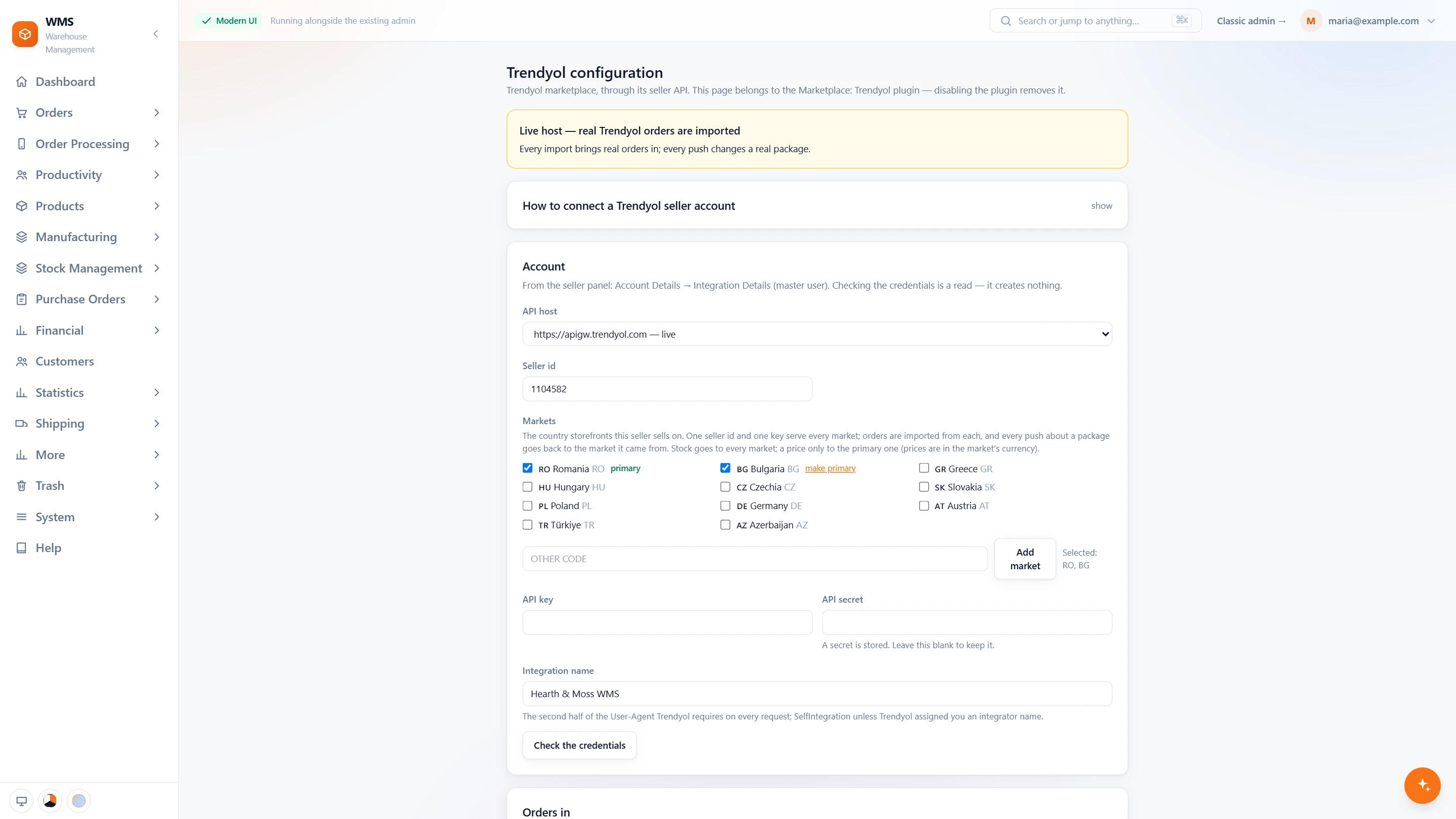
Connect your Trendyol seller account
- Live or stageChoose Trendyol's live host or its stage host; the page says in one sentence which one it is.
- Your seller detailsSeller id, API key and secret from the seller panel; the secret is kept and never shown.
- Storefronts by countryRomania, Bulgaria, Greece, Hungary, Czechia, Slovakia, Poland, Germany, Austria, Türkiye and Azerbaijan, on one seller id and key.
- Stock everywhere, price at homeStock goes to every market you tick; the price goes to the primary one, in its currency.
- Check the credentialsOne click checks them. Nothing is created.
- Orders in, from a dateChoose which Trendyol statuses are imported, and from which date.
- What goes backStatuses, tracking numbers, invoice links, stock and prices can each be pushed to Trendyol.
- Statuses that match yoursChoose which of your statuses mean picking, invoiced and cancelled, with a cancellation reason.
- Products and parcelsMatch products by barcode or SKU, register the webhook, and set carrier codes for parcels you ship yourself.
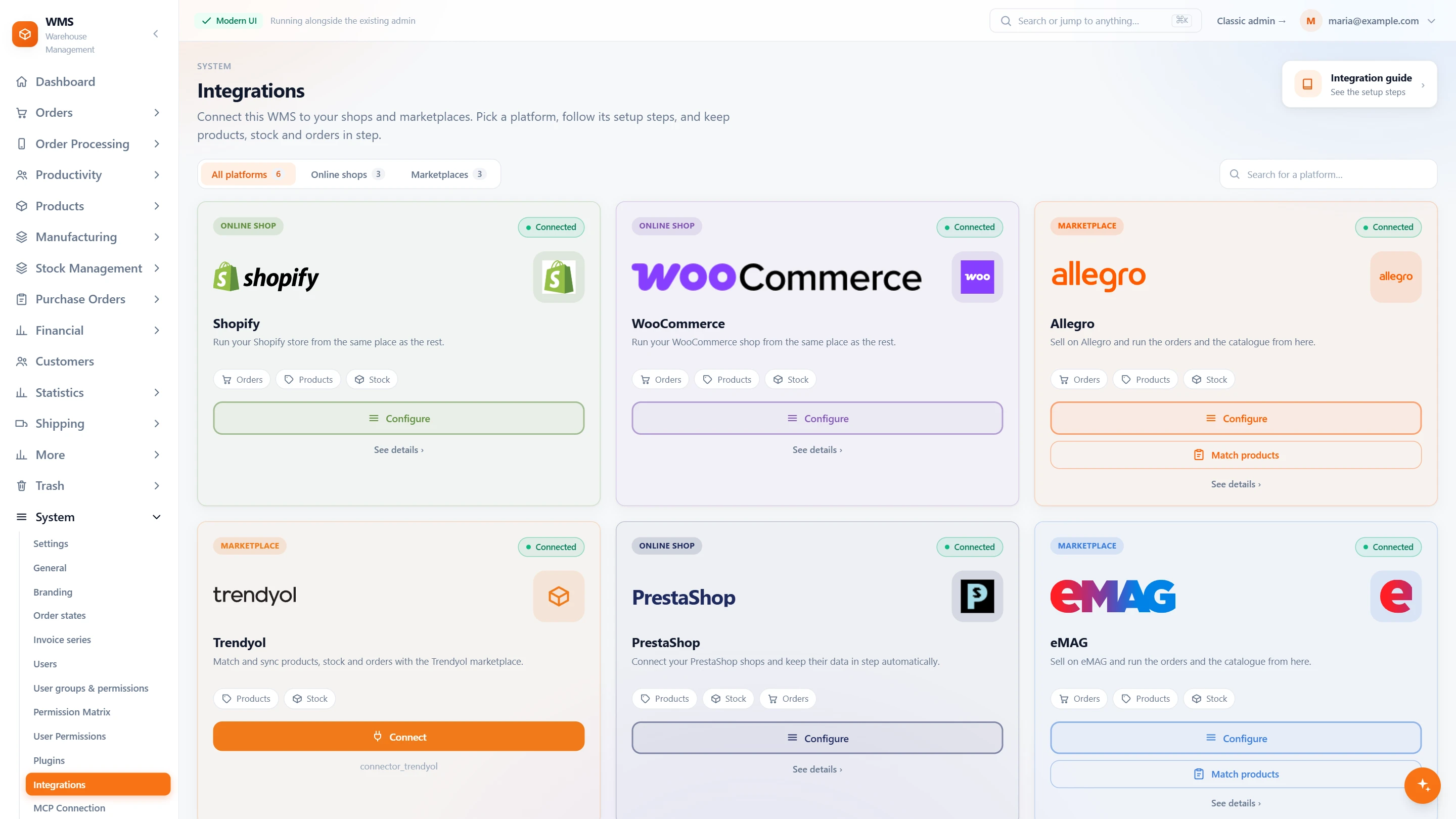
All your channels on one page
- Every shop and marketplaceSettings › Integrations lists each platform on a card, filtered by online shops or marketplaces.
- What each one syncsThe Trendyol card shows what its product connector syncs: products and stock.
- Connect from the cardOne button starts the connection from the same page.
In daily selling
- One order per packageEach Trendyol package arrives as its own order, so split and partly cancelled orders stay right.
- The right labelTrendyol's own label for packages Trendyol ships, your courier's label for packages you ship.
- Trendyol always knowsPicking and Invoiced are sent as you work, and the tracking number for your own parcels.
- Rehearsed on chosen ordersEvery update starts switched off, and a test list of order numbers keeps a rehearsal to the orders you pick.
- Built on Order V2The connection uses Trendyol's Order V2, required from 15 October 2026.
From a Trendyol package to a parcel on its way
- 01The package arrivesEach Trendyol package is imported into Pulsa as its own order.
- 02Picked by scanA picking list sorted by rack and bin leads your team through the warehouse, and Trendyol hears the order is being picked.
- 03Packed by scanEvery item is checked by scan before the parcel is closed.
- 04The right labelTrendyol's own label for packages Trendyol ships, or your courier's label for packages you ship.
- 05Trendyol is updatedThe status, and for your own courier the tracking number, go back to Trendyol.
What moves between Trendyol and your warehouse
Setting up Trendyol with Pulsa
- 01Your seller details
Add your Trendyol seller ID, API key and secret.
- 02Rehearsed on chosen orders
A test list of Trendyol order numbers keeps a rehearsal to the orders it is meant for.
- 03Listings matched, if you want
The separate product connector links your Trendyol listings to your products: by hand, by EAN or by SKU, with a dry run first.
- 04Switched on
Every update to Trendyol starts switched off and is turned on when you are ready.
- A Trendyol seller account with API access: seller ID, API key and secret
- An EAN or SKU on each product, if you match listings
We set it up with you during onboarding, and every connection starts switched off until it has been tested.





Questions about Trendyol
What does the Trendyol integration actually do?
It imports your Trendyol packages into Pulsa as orders, sends statuses and tracking numbers back, prints Trendyol's own labels, and sends price and stock to your listings.
Who ships my Trendyol orders?
Either. Packages Trendyol ships get Trendyol's own label (FAN Courier in Romania); packages you ship with your own courier get that courier's label, and the tracking number is sent to Trendyol.
Do I have to send my products to Trendyol from Pulsa?
No. If your products are already listed, switch on the orders connection alone. The product connector is separate and optional.
Can I try it before it touches real orders?
Yes. Every update to Trendyol starts switched off, and a test list of Trendyol order numbers keeps a rehearsal to the orders you choose.
How are my listings matched to my products?
With the optional product connector: by hand, by EAN or by SKU. A mass match shows a dry run first, and every decision is logged.
Is Trendyol's new order system supported?
Yes. The connection is built on Trendyol's Order V2, required from 15 October 2026.