
Know what to reorder before it runs out.
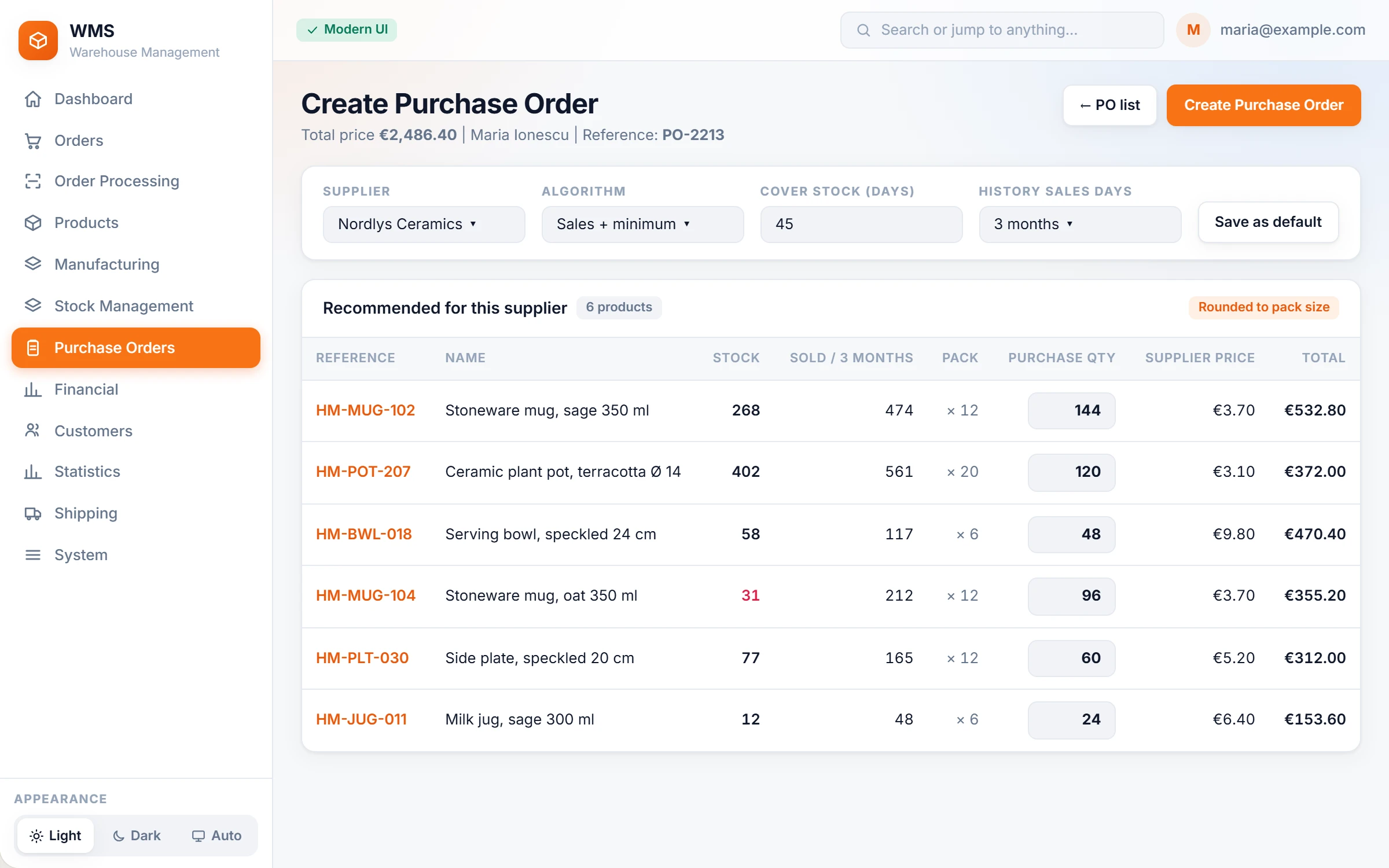
Choose a supplier and Pulsa proposes what to buy, from your stock and your recent sales. You check the quantities, and the purchase order goes to the supplier by e-mail.
Reordering by feel, and the best seller out of stock again.
Purchase orders are built in a spreadsheet from memory, and the product customers want most is the one that runs out. A one-off bulk sale makes a product look popular for months, and two buyers order the same goods from the same supplier.
How it works in Pulsa
Choose the supplier
No more gathering figures from several places: you see that supplier's products with their stock, sales history and supplier price. An unfinished draft for that supplier is offered to resume, so two buyers do not build competing orders.
Say how long the order should last
Instead of guessing, set how many days of sales the order should cover and which past period the proposal is calculated from: 7 to 90 days, a number of days, or a date range.
Check the proposal
No calculator needed: quantities come from the minimum and recommended stock levels and are rounded up to the supplier's case or pallet size. Change any line; every change is saved to the draft at once, so nothing is lost if you are interrupted.
Create and send
Set the manager, delivery address and expected date, review the lines and create the order. Notify e-mails it to the supplier, so nothing is copied into a separate e-mail.
Follow it to the door
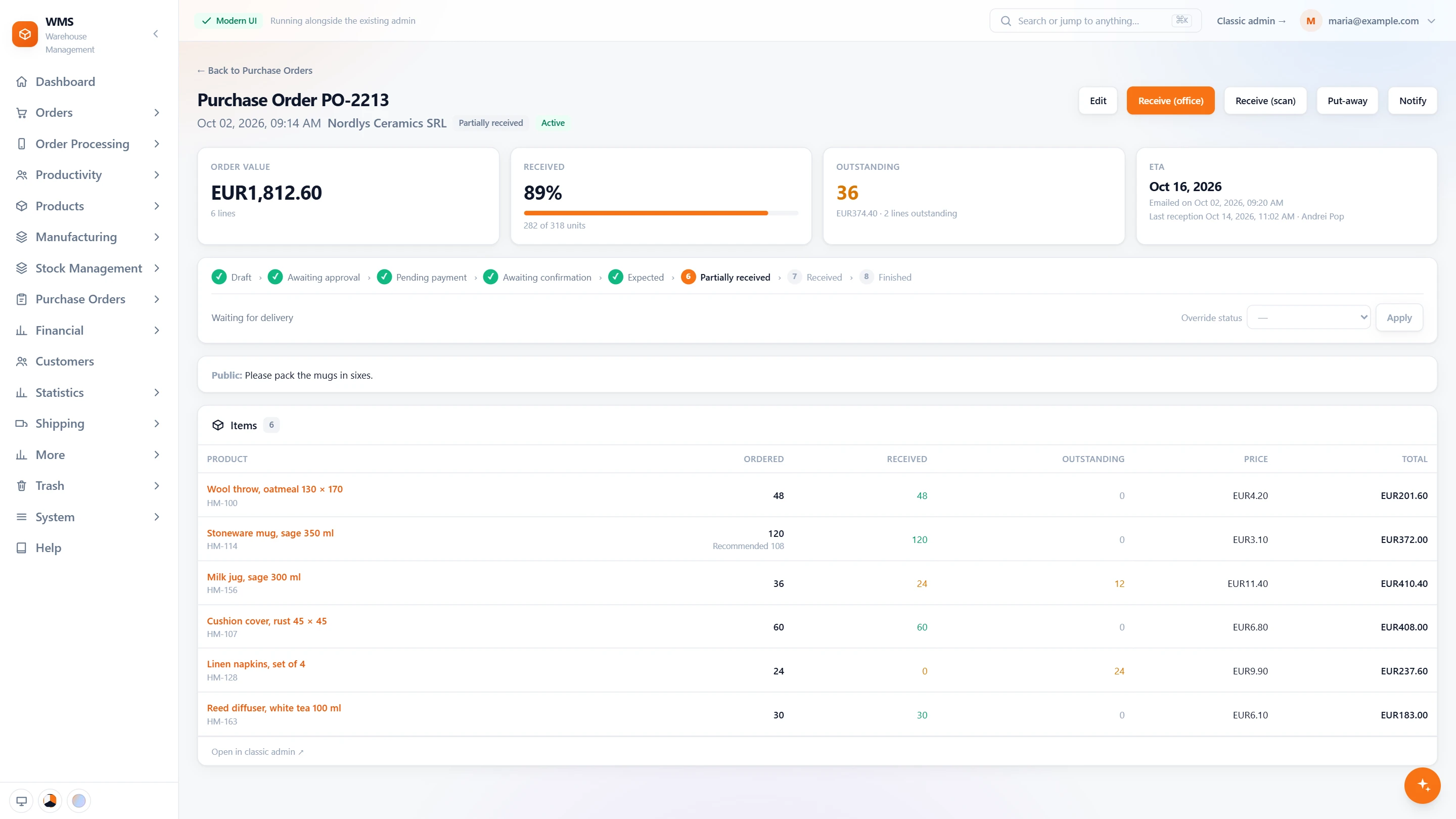
No more asking around whether an order was paid or has arrived. The order moves from Draft through approval and payment to Expected, Partially received, Received and Finished. Only expected orders count as stock on its way.
Everything purchasing does, from the buy list to the delivery.
Buying without spreadsheets, guesswork or double orders: a recommended quantity for every product, the purchase order through its statuses, and the stock levels behind it all.
A buy list that explains itself
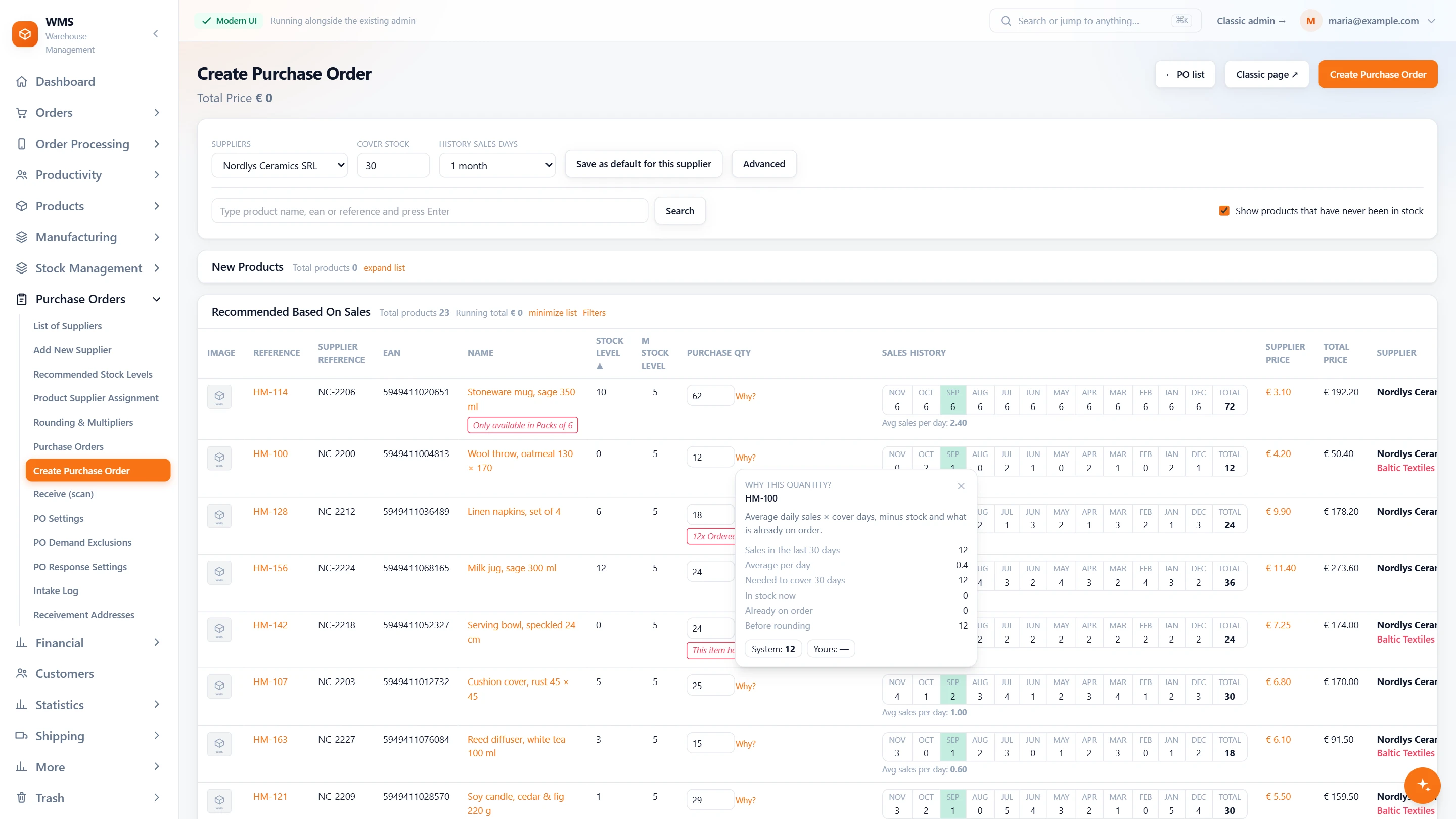
Building an order from memory means some products run out and others pile up. This list proposes a quantity for every product and shows why, so you can trust it or change it in seconds.
- One supplier at a timeEverything for one order in one place: choose the supplier, how many days of stock to cover and the sales period to look back on.
- Three listsNothing slips through: recommended from sales, recommended because stock is under the minimum, and every product of the supplier.
- A year of sales per productNo digging through old reports: monthly sales, the total and the average per day, with the months a delivery arrived marked.
- Why this quantity?No black box. Open any line: sales in the period, what is in stock, what is already on order, and the result before rounding.
- Warnings where they matterThe mistakes that cost money are flagged before you order: only sold in packs of 6, already ordered from another supplier, out of stock for a long time.
- Every supplier's priceNo comparing price lists by hand: the other suppliers of a product are listed with their price, the cheapest one in red.
The purchase order, step by step
Once an order is sent, it is easy to lose track: was it approved, paid, delivered in full? Each order shows where it stands and what to do next.
- Where it standsNo phone calls to find out: order value, the share received, what is still outstanding and the expected date, with how many days late.
- Every status on one lineEveryone sees the same answer: draft, awaiting approval, pending payment, awaiting confirmation, expected, partially received, received, finished.
- The next step as a buttonNo wondering what comes next: approve, mark as paid or confirmed, finish; any status can also be set by hand.
- Receive two waysTake the delivery in where it suits you: in the office, or by scanning on the warehouse floor, then put away to locations.
- Line by lineA short delivery is spotted at once: ordered, received and outstanding per product, and the recommended quantity when the buyer changed it.
- Sent to the supplierNo separate e-mail to write: email the order to the supplier, and the page says when it was sent.
Stock levels behind the recommendation
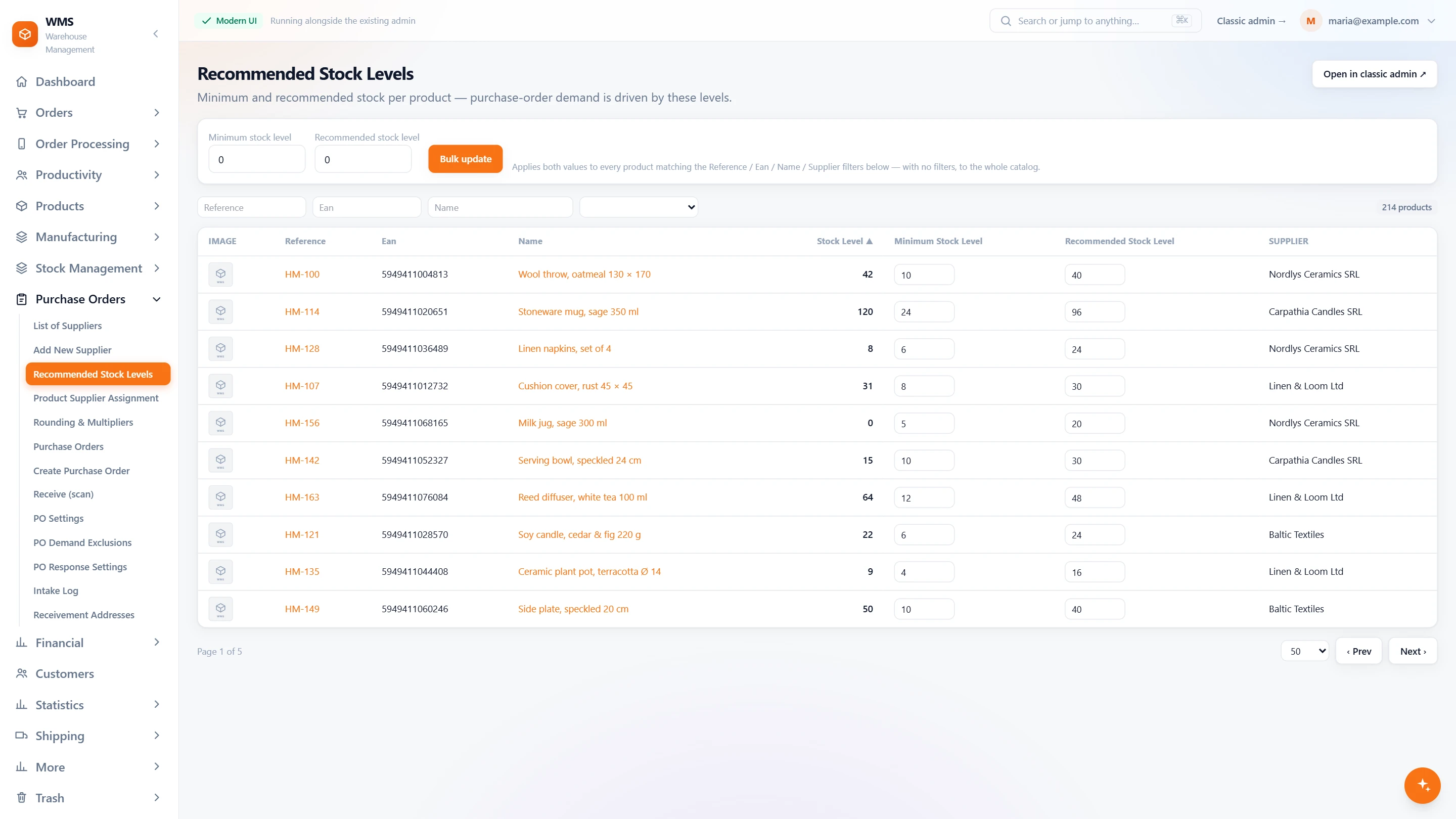
Without set levels, "when do we reorder?" depends on who is asking. A minimum and a target per product turn it into a rule the buy list follows.
- Minimum and recommendedSet a minimum and a recommended stock level for each product, right in the list, without opening each product.
- Many products at onceNo editing hundreds of products one by one: apply the same levels to every product that matches a reference, barcode, name or supplier.
- They drive the buy listA product under its minimum is recommended up to its target level, whatever its sales, so slow but needed items never run out.
Suppliers and the rules of buying
Every supplier has its own lead times, prices and pack sizes, and keeping them in your head leads to late or refused orders. Pulsa keeps the rules, so each order follows them.
- SuppliersA list of suppliers, each with its own lead time used for the expected date, so you know when goods should really arrive.
- Who supplies whatAssign products to suppliers, with each supplier's price, so the buy list knows where to order each product.
- Packs and roundingNo orders refused for an odd quantity: order only in packs of a set size, or round quantities to a multiple.
- Drafts keptAn interruption costs nothing: an unfinished order is kept as a draft, to resume or discard later.
- Leave products outStop seeing what you no longer buy: exclude products from the recommendation, or mark products as discontinued straight from the buy list.
- Delivery addresses and logsSeveral receiving addresses, and a log of every delivery taken in, so you can always check what arrived.
What you gain
Fewer empty shelves
Reordering follows what really sold, against the levels you set per product, so best sellers are reordered before they run out.
Orders the supplier accepts
No orders sent back for the wrong quantity: they are rounded to the supplier's pack size and minimum order.
Real profit figures
No guessing what a sale really earned: purchase cost is kept first in, first out, so the profit on every sale uses what you actually paid.
Connected to the shops, marketplaces and couriers you already use.
Questions
Can we leave a one-off bulk order out of the calculation?
Yes. Demand exclusions leave chosen sales out, so one large order does not inflate the proposals for months and fill the shelves with stock nobody buys.
What if a product has no supplier?
It cannot be proposed automatically, so it could be forgotten. Product supplier assignment shows those gaps so they can be filled.
Can a supplier send us their stock and prices?
Yes, with supplier feeds: their stock and prices are kept up to date in Pulsa, so nobody copies them from a price list.
Is there an approval step?
Yes, so nothing counts as on its way before it really is. A purchase order can wait for internal approval, payment or the supplier's confirmation before it counts as expected.
Related features
All featuresSee it with your own orders.
In the demo we connect your channels and walk you through this part of Pulsa on the real screens.