

Royal Mail labels, printed as the parcel is packed.
Through Royal Mail's Pro Shipping API: labels with customs details and service extras, tracking, cancelling, and an optional switch to Large Letter for items that qualify.
- 100%of items scanned before the label is printed
- 1screen to pack the parcel and print its label
- 13+couriers, all with the same print buttons
- 0labels retyped on the courier's own website
Royal Mail labels straight from your warehouse, without retyping a thing.
For many UK sellers, Royal Mail is the everyday courier, and the label is where the time goes. Someone copies the address from the order into Royal Mail's own screens, picks the service, types the customs details for parcels going abroad, then copies the tracking number back. It is slow, and a single wrong digit in a postcode or a forgotten customs line means a parcel that comes back.
With Pulsa connected, the label is made from the order itself. Your team picks and packs by scan, and the Royal Mail label is printed at packing, or for every order when a picking list is finished. The service comes from the delivery option the customer chose, customs items travel with international parcels, and the tracking link is saved on the order. A label can be cancelled from the orders list.
You keep your own Royal Mail business account, your contract and your rates. Pulsa uses the Pro Shipping API, so it suits sellers whose account has access to it. Picking, packing and stock work as for any other order; only the label step changes. If your account runs on Royal Mail Click & Drop instead, there is a separate integration for that.
Faster labels, fewer returned parcels
Everything the Royal Mail integration does.
What the Royal Mail plugin of Pulsa really does through the Pro Shipping API, on its own settings page and in daily shipping.
Connect your Royal Mail account
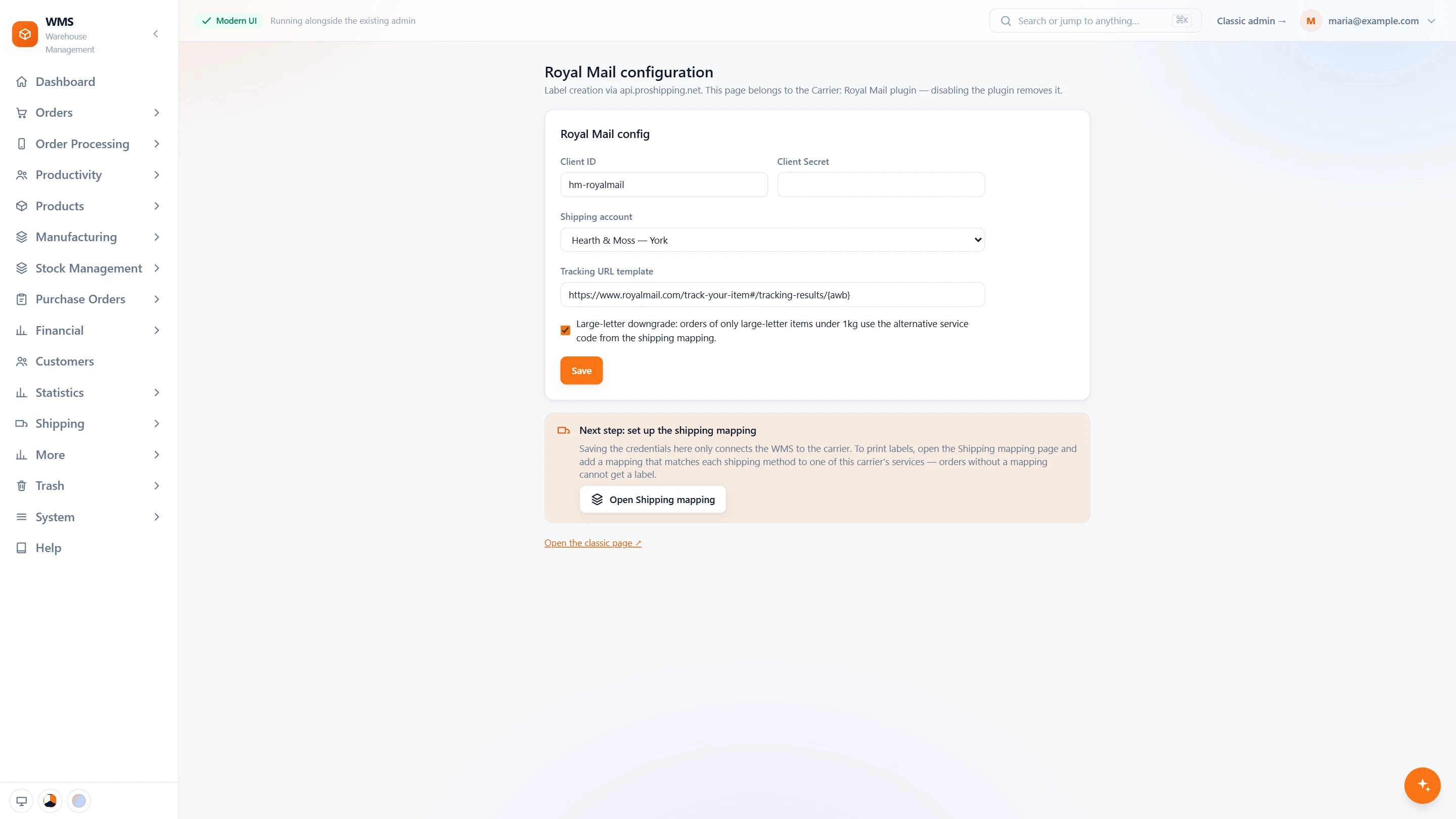
- Your own accountYour Royal Mail client id and secret, the API credentials of your business account.
- Pick the shipping accountChoose your shipping account from the list your Royal Mail account returns, instead of typing a number.
- Tracking linkThe link to Royal Mail's tracking page is kept on every order.
- Large Letter when it fitsOrders of only large-letter items under 1 kg use the alternative service set on the shipping mapping.
- Then the shipping mappingThe page reminds you of the last step: link each shipping method of your shop to a Royal Mail service.
In daily shipping
- Two ways to a labelPrint from the orders list or the picking list, or let it be made when packing finishes.
- Ready for customsParcels going abroad carry their customs items with the label.
- The customer's choiceThe delivery option the customer chose decides the Royal Mail service.
- Cancel and trackCancel a label from the orders list, and keep the tracking link on the order.
- Not Click & DropAccounts on Royal Mail Click & Drop use a separate integration.
From a packed order to a Royal Mail label
- 01The order is pickedA picking list sorted by rack and bin leads your team through the warehouse, and every item is scanned.
- 02Packed by scanThe parcel is checked item by item before it is closed.
- 03The service is chosenThe customer's delivery option decides the Royal Mail service, or Large Letter if the item qualifies and the switch is on.
- 04The label is printedPulsa creates the label through Royal Mail, with customs items for parcels going abroad.
- 05Tracking on the orderThe tracking link is saved on the order, and the parcel is ready for Royal Mail.
What moves between Royal Mail and your warehouse
Setting up Royal Mail with Pulsa
- 01Your Royal Mail account
Add your API credentials and your shipping account. Pulsa keeps itself signed in from then on.
- 02Delivery options mapped
Each delivery option in your shops is matched to a Royal Mail service.
- 03Large Letter, if you want it
Turn on the switch to send items that qualify as Large Letters.
- 04First labels checked
Print and check the first labels before the team relies on them.
- A Royal Mail business account with access to the Pro Shipping API
- Your Royal Mail shipping account number
We set it up with you during onboarding, and every connection starts switched off until it has been tested.




Questions about Royal Mail
What does the Royal Mail integration do?
It creates Royal Mail labels from your orders as they are packed, with customs details for international parcels, and saves the tracking link on each order. Labels can also be cancelled from Pulsa.
Do I need a developer to set it up?
No. You paste the API credentials and shipping account from your Royal Mail account, then match your delivery options to Royal Mail services on one page.
Can I send parcels abroad?
Yes. Labels carry the customs items that international parcels need.
Can I try it before the whole team uses it?
Yes. Print and check the first labels on a few orders before switching your daily work over. A label you do not need can be cancelled from the orders list.
Can I use Royal Mail alongside other couriers?
Yes. Each delivery option in your shops is matched to a service, so some orders can go with Royal Mail and others with another courier connected to Pulsa.
How is this different from Click & Drop?
This integration uses Royal Mail's Pro Shipping API. Click & Drop is a separate integration for accounts that use Royal Mail's Click & Drop platform. Choose the one your Royal Mail account uses.