
Screens built for the hand that holds the scanner.
The floor screens show one line at a time with the location in big letters, are driven by scanning instead of typing, and run on handheld scanners and phones.
Office software on a warehouse floor.
Small text, long tables and fields to tap before every scan slow the floor down. New people need a week of training, and in poor light a wrong tap or a wrong bin is easy, and only shows up when a customer gets the wrong item.
How it works in Pulsa
One line at a time
No more hunting through a long list on a small screen. The picker sees where to go, what to take and how many, with the rack and bin as the biggest things on the screen.
A warning before the wrong bin
It is easy to keep taking from the bin you are standing at. A banner says when the next line is in a different rack, so the picker walks on instead of grabbing the wrong item.
Scan, do not type
Typing on a handheld is slow and full of mistakes. Instead, skip a line when stock is missing, step back to correct one, or confirm one whose barcode is damaged. On the packing screen a scan is taken anywhere on the page, so nobody taps a field first.
Sign in with a QR code
Long passwords on a small keyboard waste the start of every shift. A user signs in on a warehouse device by scanning a code instead.
Readable in any light
A screen that cannot be read in bright light or a dark aisle leads to mistakes. Light, dark and high-contrast themes help, and each person works in their own language.
Everything the floor screens do, in the hand that holds the scanner.
Screens built for a hand, a thumb and a quick glance, not a desk: here are the Pulsa screens as a handheld scanner shows them, at the size of a Zebra TC20, with the same made-up shop as everywhere on this site.
Picking and packing
Picking from a small screen usually means squinting, tapping and taking from the wrong bin. These screens show one clear step at a time, so orders go out right the first time.
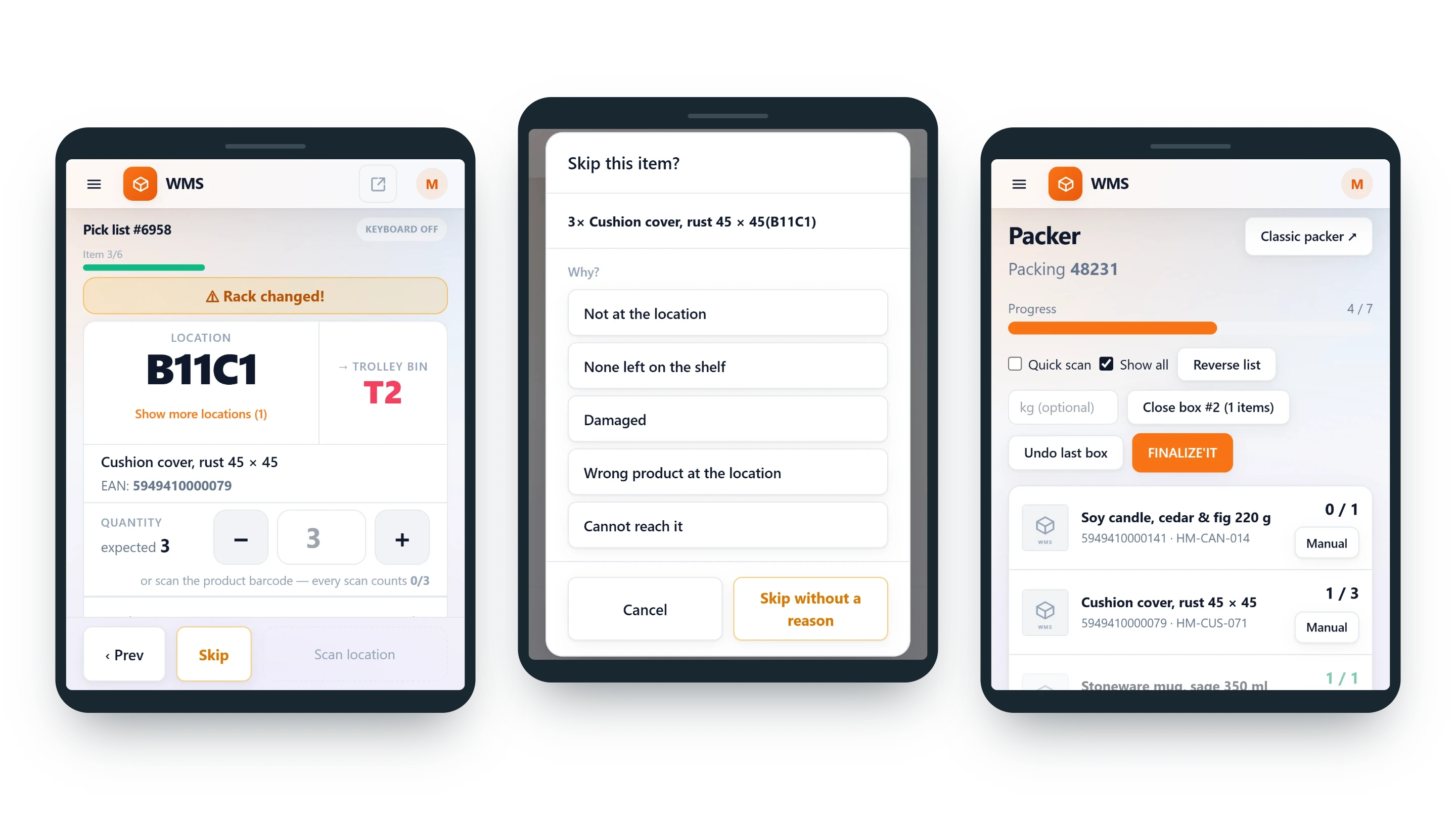
- Where to go, in big lettersRack and bin are the biggest thing on the pick screen, with the trolley bin the item goes into beside them, so the picker reads it at a glance while walking.
- Rack changed!A banner says when this line is in a different rack, so nobody takes from the bin they are still standing at.
- Scan or tap the quantityNo counting out loud or typing numbers: every scan of the product counts one, and the minus and plus buttons are big enough for a thumb.
- Skip with a reasonAn empty shelf no longer holds up the whole list. Not at the location, none left on the shelf, damaged: the reasons are the warehouse's own, and the office sees them and can act.
- Packing on the same deviceNo walking to a desk to pack. The packer shows the order's progress and the lines still to pack, and closes one box after the other.
- Fix a mistake on the spotGo back a line to correct it, or confirm a line by hand when its barcode is damaged, instead of leaving the order stuck.
Receiving, counting and looking up
Deliveries, counts and "where does this go?" questions usually mean paper lists and trips to the office. On the scanner they are done where the goods are.
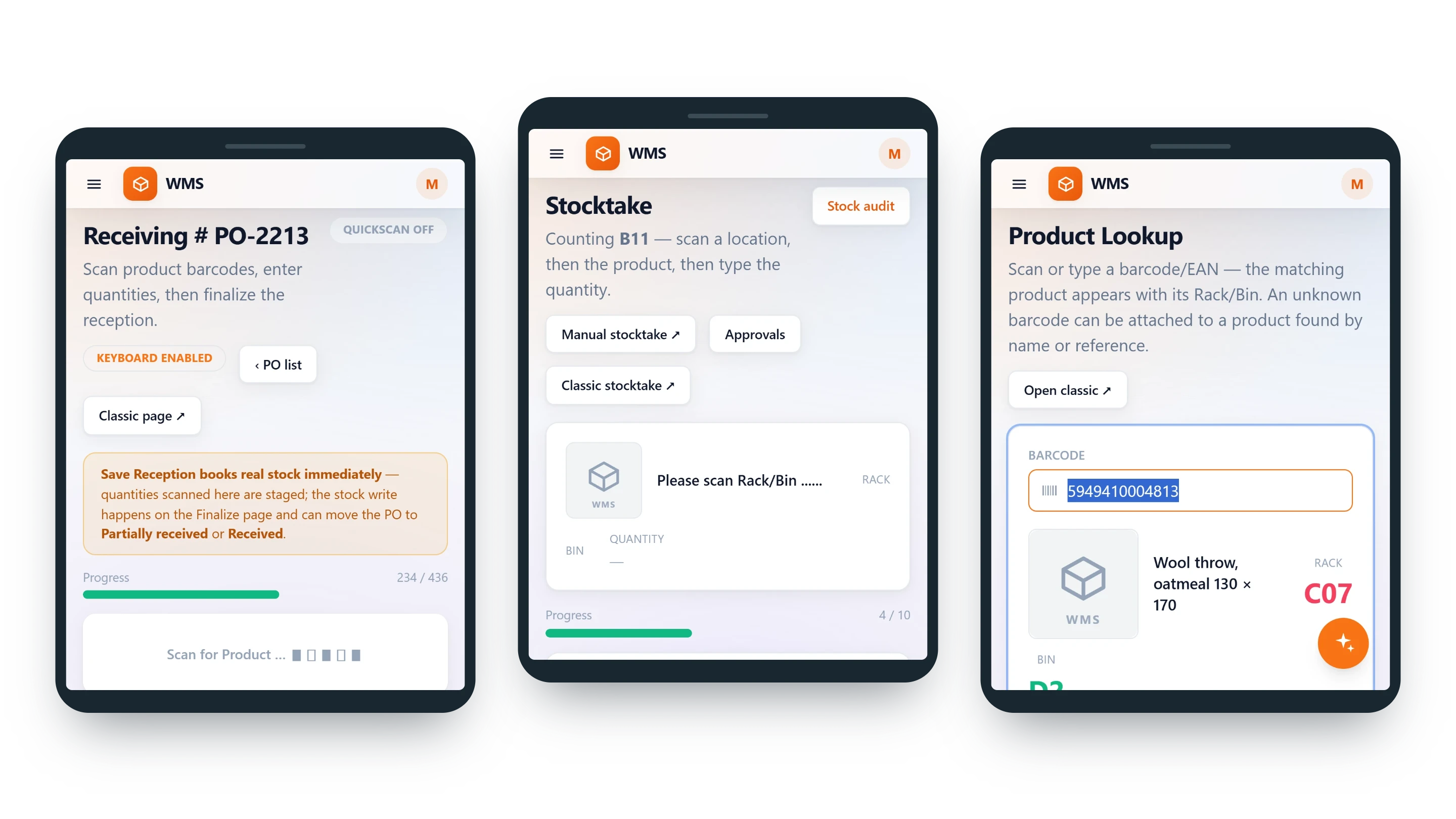
- Receive a deliveryNo ticking off a paper list: scan the products of a purchase order, and the progress shows what has arrived and what is still to come.
- Count a rackCounting without a clipboard to type up later: scan the location, scan the product, type the quantity.
- Find a productA loose item no longer waits on a shelf for someone who knows where it goes. Scan it and its rack and bin appear in large letters.
- The same screens as the officeNothing extra to learn or keep in step: every page adapts to the scanner's screen, and nothing is a separate app with its own rules.
Ready for the floor
Warehouse devices are shared, held in gloves and used in every kind of light. These details take away the small daily frictions that slow a shift down.
- Sign in with a QR codeNo typing passwords on a tiny keyboard: a user signs in on a warehouse device by scanning a code.
- Nothing to installNo apps to set up on every device: the scanner types straight into the screen, and the device needs no extra software.
- The scanners you haveNo need to buy a new fleet: handheld scanners in everyday use, such as the Zebra TC20 and MC3300, and phones work.
- No keyboard in the wayA keyboard that pops up over the screen hides what matters. The screens can be used with the on-screen keyboard switched off, so a scan never opens it by mistake.
- Readable in any lightLight, dark and high-contrast themes, and each person in their own language, so nobody misreads a line.
- Every scan recordedWhen an order goes wrong, you can see what happened: the scanner log keeps every scanner action, and the picking and packer logs every pick and pack.
What you gain
New staff working in a day
No week of training: the screen says what to do next, so there is little to learn.
Fewer wrong picks
Every line is confirmed by a scan, so a wrong item is caught at the shelf, and skipped lines are recorded, not lost.
Nothing to install
No apps to set up or keep updated: the scanner types straight into the screen, and the device needs no extra software.
Questions
Do we need new scanners?
Usually not, so there is no big hardware bill to start. Handheld scanners in everyday use, such as the Zebra TC20 and MC3300, and phones are used.
What if stock is missing at a bin?
The picker skips the line and moves on. A skipped line tells the office the order is short and the bin needs checking, instead of a wrong quantity quietly entering the stock.
Is every scan recorded?
Yes, so when something goes wrong you can see what happened instead of guessing. The scanner log records every scanner action, and the picking and packer logs every pick and pack.
Related features
All featuresSee it with your own orders.
In the demo we connect your channels and walk you through this part of Pulsa on the real screens.