
Royal Mail Click & Drop, without retyping a single order.
Pulsa creates the Click & Drop order and its label as the parcel is packed, and sends light items as Large Letters below the weight you set.
- 100%of items scanned before the label is printed
- 1screen to pack the parcel and print its label
- 13+couriers, all with the same print buttons
- 0labels retyped on the courier's own website
Keep Click & Drop. Stop typing orders into it.
Click & Drop is how many UK sellers buy Royal Mail postage. But when orders come from your own shop, a marketplace and the phone, getting them into Click & Drop is a job in itself: importing files, copying addresses, deciding parcel or Large Letter item by item, then finding the tracking number again for the customer. On a busy day, that is where orders get missed or sent twice.
With Pulsa connected, the order is created in Click & Drop for you, together with its label, when the parcel is packed or when a picking list is finished. The service comes from the delivery option the customer chose. Items under the weight you set go as Large Letters automatically, and the tracking link is saved on the order in Pulsa.
You keep your Click & Drop account and your Royal Mail prices. Pulsa takes over the typing; Click & Drop stays the place where you cancel a label or manage your account, and the orders list in Pulsa reminds you of that. It suits any UK seller already using Click & Drop.
Less copying, fewer missed orders
Everything the Royal Mail Click & Drop integration does.
What the Click & Drop plugin of Pulsa really does, on its own settings page and in daily shipping.
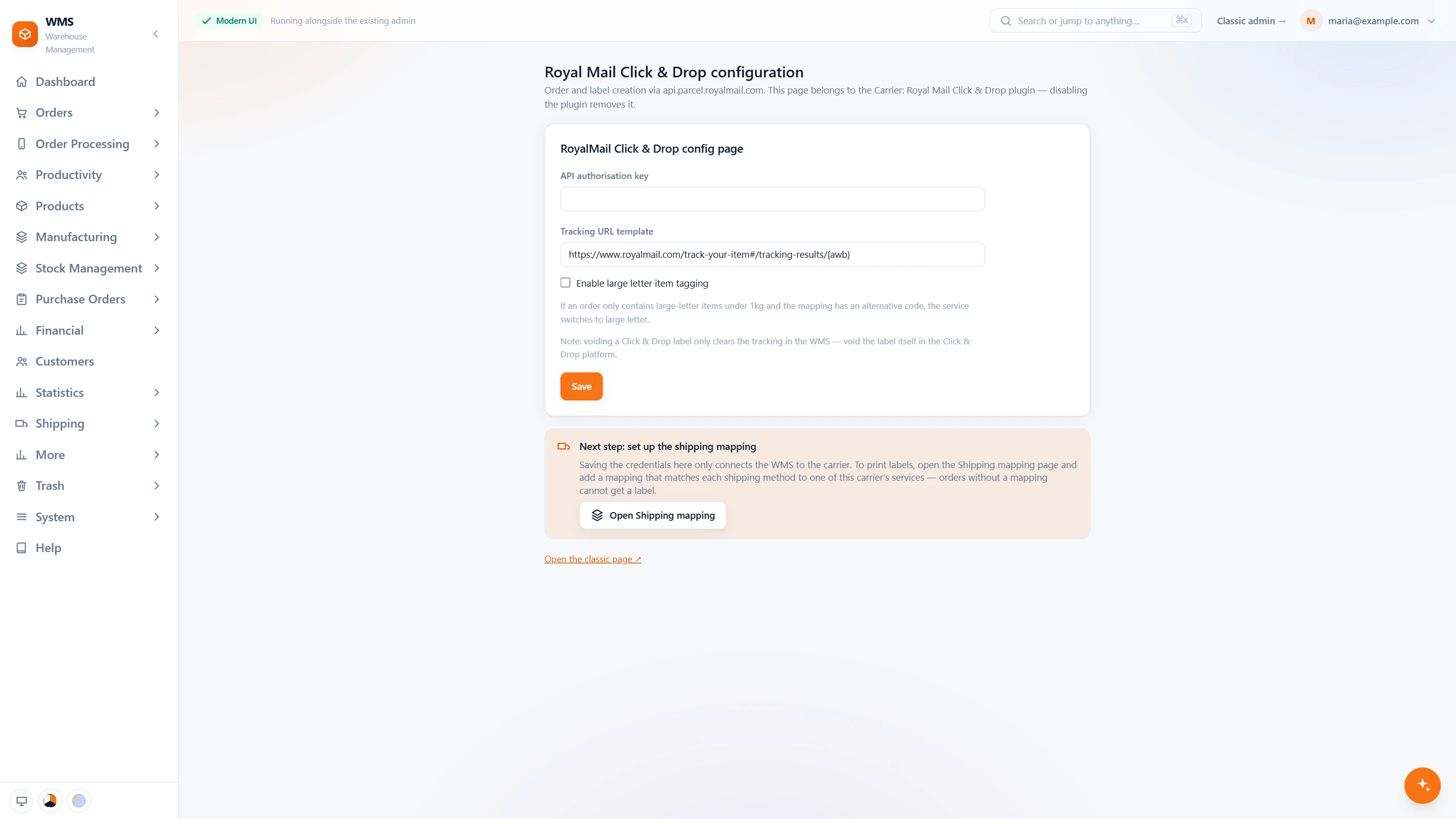
Connect your Click & Drop account
- One keyThe access key from your Click & Drop account is all it needs.
- Tracking linkThe link to Royal Mail's tracking page is kept on every order.
- Large Letter when it fitsAn order of only large-letter items under 1 kg switches to Large Letter when the mapping has an alternative service.
- Voiding stays in Click & DropVoiding a label in Pulsa only clears the tracking; the label itself is voided in Click & Drop, and the page says so.
- Then the shipping mappingThe page reminds you of the last step: link each shipping method of your shop to a Royal Mail service.
In daily shipping
- Two ways to a labelPrint from the orders list or the picking list, or let it be made when packing finishes.
- No more importsThe order and its label are created in Click & Drop from the order itself, address included.
- The customer's choiceThe delivery option the customer chose decides the Royal Mail service.
- Tracking on every orderThe tracking link is saved on the order, so your team can find it when a customer asks.
From a packed order to a Click & Drop label
- 01The order is pickedA picking list sorted by rack and bin leads your team through the warehouse, and every item is scanned.
- 02Packed by scanThe parcel is checked item by item before it is closed.
- 03Parcel or Large LetterPulsa compares the weight with your threshold and takes the Royal Mail service from the delivery option.
- 04Created in Click & DropThe order and its label are created in Click & Drop, and the label is printed.
- 05Tracking on the orderThe tracking link is saved on the order, and the parcel is ready for Royal Mail.
What moves between Royal Mail Click & Drop and your warehouse
Setting up Royal Mail Click & Drop with Pulsa
- 01Your Click & Drop account
Add the API key from your Click & Drop account.
- 02Delivery options mapped
Each delivery option in your shops is matched to a Royal Mail service.
- 03Large Letter weight
Set the weight in grams under which items go as Large Letters.
- 04First labels checked
Print and check the first labels before the team relies on them.
- A Royal Mail Click & Drop account with API access
- Product weights in Pulsa, if you use the Large Letter switch
We set it up with you during onboarding, and every connection starts switched off until it has been tested.




Questions about Royal Mail Click & Drop
What does the Click & Drop integration do?
It creates your orders and their labels in Royal Mail Click & Drop as parcels are packed, sends light items as Large Letters below the weight you set, and saves the tracking link on each order.
Do I need a developer to set it up?
No. You paste the API key from your Click & Drop account, match your delivery options to Royal Mail services and, if you want, set the Large Letter weight.
Can I cancel a label from Pulsa?
No. Click & Drop labels are cancelled in Click & Drop itself, and the orders list in Pulsa reminds you of this.
Do I still need the Click & Drop website?
Only to cancel labels or manage your account. Orders and labels are created by Pulsa.
Can I try it before the whole team uses it?
Yes. Print and check the first labels on a few orders before switching your daily work over.
How is this different from Royal Mail (Pro Shipping)?
They are two separate Royal Mail systems. Choose the one your Royal Mail account uses.