


DHL Parcel UK labels, with the service chosen by weight.
Pulsa picks the DHL service from the parcel's weight, creates the label for one or several parcels, and keeps itself signed in to DHL.
- 100%of items scanned before the label is printed
- 1screen to pack the parcel and print its label
- 13+couriers, all with the same print buttons
- 0labels retyped on the courier's own website
DHL Parcel UK labels that choose the right service by themselves.
With DHL Parcel UK, the service often depends on how heavy the parcel is. Done by hand, that means weighing, looking up which service fits, typing the address into DHL's screens and copying the tracking number back to the order. Pick the wrong weight band and the shipment costs more or gets queried; forget a parcel and a big order arrives in pieces.
With Pulsa connected, the label is made from the order as it is packed, or for every order when a picking list is finished. The weight ranges you set decide the DHL service, chosen from DHL's live list. One shipment can carry several parcels, the tracking link is saved on the order, and if you want, the order moves to Shipped as soon as its label is made.
You keep your own DHL Parcel UK account and rates. Pulsa keeps itself signed in to DHL, a label can be cancelled from the orders list, and the integration can be switched off at any time: it keeps its settings and makes no calls until you switch it back on. It suits UK sellers shipping with DHL Parcel UK.
The right service, without the guesswork
Everything the DHL Parcel UK integration does.
What the DHL Parcel UK plugin of Pulsa really does, on its own settings page and in daily shipping.
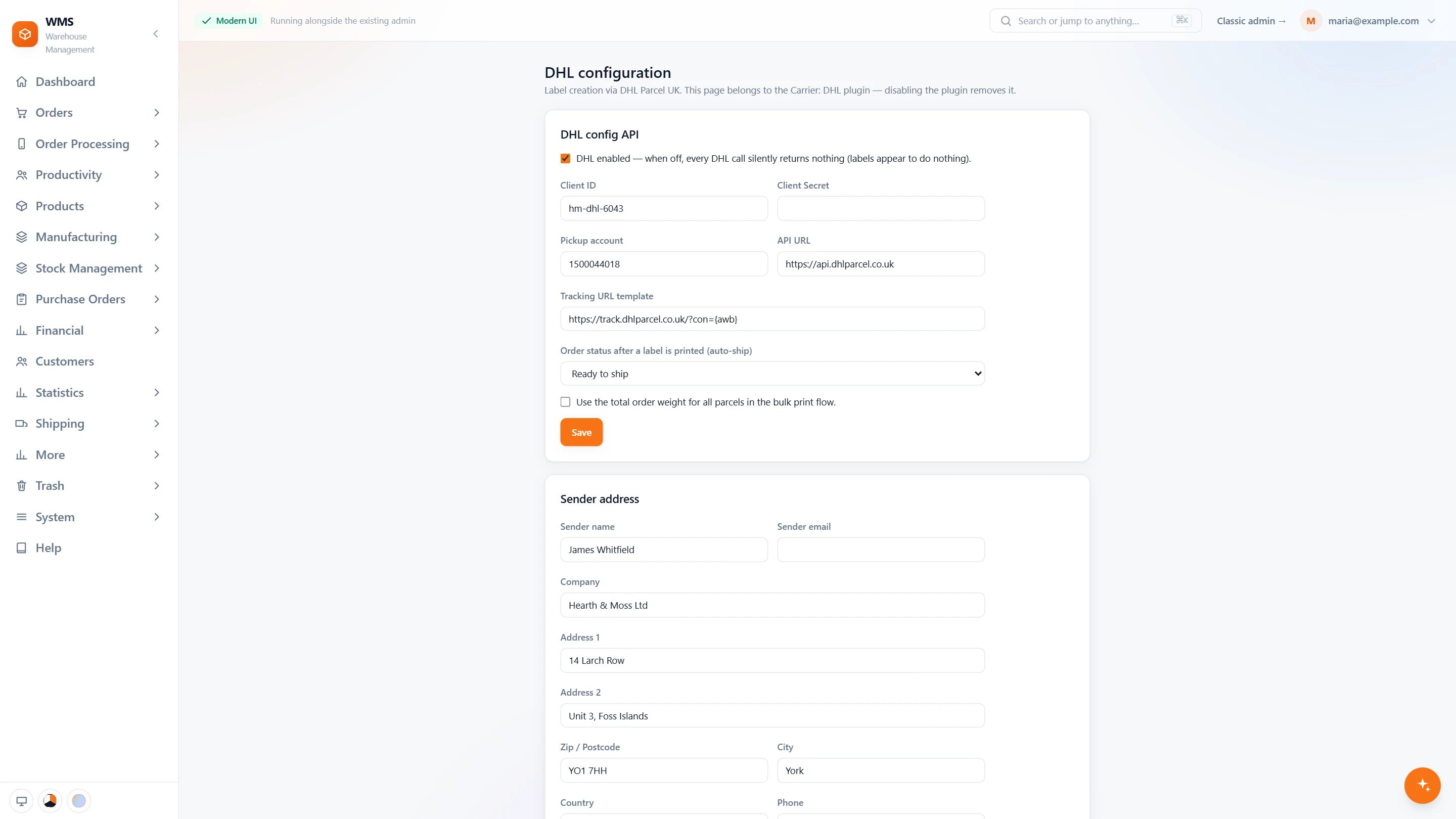
Connect your DHL Parcel UK account
- On or pausedOne switch: off, DHL makes no calls at all and keeps its settings.
- Your own accountYour DHL client id and secret, your pickup account and the API address.
- Tracking linkThe link to DHL's tracking page is kept on every order.
- Shipped after the labelChoose the order status set as soon as a label is printed.
- One weight for every parcelWhen printing in bulk, use the order's total weight for all its parcels.
- The senderCompany, address and contact printed as the sender.
In daily shipping
- Two ways to a labelPrint from the orders list or the picking list, or let it be made when packing finishes.
- Service chosen by weightThe weight ranges you set decide the DHL service, from DHL's live list.
- Several parcels, one shipmentA big order travels as several parcels on one shipment.
- Cancel and trackCancel a label from the orders list, and keep the tracking link on the order.
- Mapped onceEach shipping method of your shop is linked to a DHL service on the Shipping mapping page.
From a packed order to a DHL label
- 01The order is pickedA picking list sorted by rack and bin leads your team through the warehouse, and every item is scanned.
- 02Packed by scanThe parcels are checked item by item before they are closed.
- 03The service is chosenThe weight decides the DHL service, from the ranges you set.
- 04The label is printedPulsa creates the shipment at DHL, with every parcel on it, and prints the label.
- 05Shipped and trackedThe order can move to Shipped, with its tracking link saved on it.
What moves between DHL Parcel UK and your warehouse
Setting up DHL Parcel UK with Pulsa
- 01Your DHL account
Add your DHL Parcel UK API credentials.
- 02Weight ranges
Set which DHL service each weight range uses, from DHL's live list.
- 03Shipped after the label
Choose whether an order moves to Shipped once its label is made.
- 04Switched on
Switched off, it keeps its settings and makes no calls at all.
- A DHL Parcel UK account with API access
- Product weights in Pulsa
We set it up with you during onboarding, and every connection starts switched off until it has been tested.




Questions about DHL Parcel UK
What does the DHL Parcel UK integration do?
It creates DHL Parcel UK labels from your orders as they are packed, picks the DHL service from the parcel's weight, and saves the tracking link on each order. Labels can also be cancelled from Pulsa.
Do I need a developer to set it up?
No. You add the API credentials from your DHL Parcel UK account and choose a DHL service for each weight range from DHL's own list.
Why do I need product weights?
The weight decides which DHL service the parcel goes with, so each product needs one in Pulsa.
Can one shipment have several parcels?
Yes.
Can I pause DHL without losing the settings?
Yes. Switched off, it keeps its settings and makes no calls.
Can I cancel a label?
Yes, from the orders list in Pulsa. The label is cancelled at DHL as well.