


DPD Romania shipments, lockers included.
Pulsa creates the DPD Romania shipment for one or several parcels, with cash on delivery and delivery to the DPD Pickup point or locker your customer chose, and prints the label in the size your printer takes.
- 100%of items scanned before the label is printed
- 1screen to pack the parcel and print its label
- 13+couriers, all with the same print buttons
- 0labels retyped on the courier's own website
DPD Romania shipments without retyping a single order.
Booking DPD Romania shipments by hand means copying each order into DPD's system: name, address, phone number, the cash on delivery amount and, more and more often, the Pickup point or locker the customer chose at checkout. Every copied detail can go wrong, and a parcel sent to the wrong locker or without its amount to collect costs time, money and a customer's patience.
With DPD Romania connected, the shipment is created as part of packing. The order is picked and checked by scan, and Pulsa creates the shipment for one or several parcels, with the cash on delivery and the customer's Pickup point or locker already on it. The label prints as an A6 thermal label, on A4, or as four A6 labels on one A4 sheet, and a shipment can be cancelled from the orders list.
Your DPD contract and pickups stay as they are. DPD provides test accounts on request, and a test list of customer emails and a start date keep the rehearsal away from real orders; automatic shipments start switched off. This integration is for DPD Romania accounts; DPD Local in the UK is a separate integration.
Less typing, the right locker, faster dispatch
Everything the DPD Romania integration does.
What the DPD Romania plugin of Pulsa really does, on its own settings page and in daily shipping.
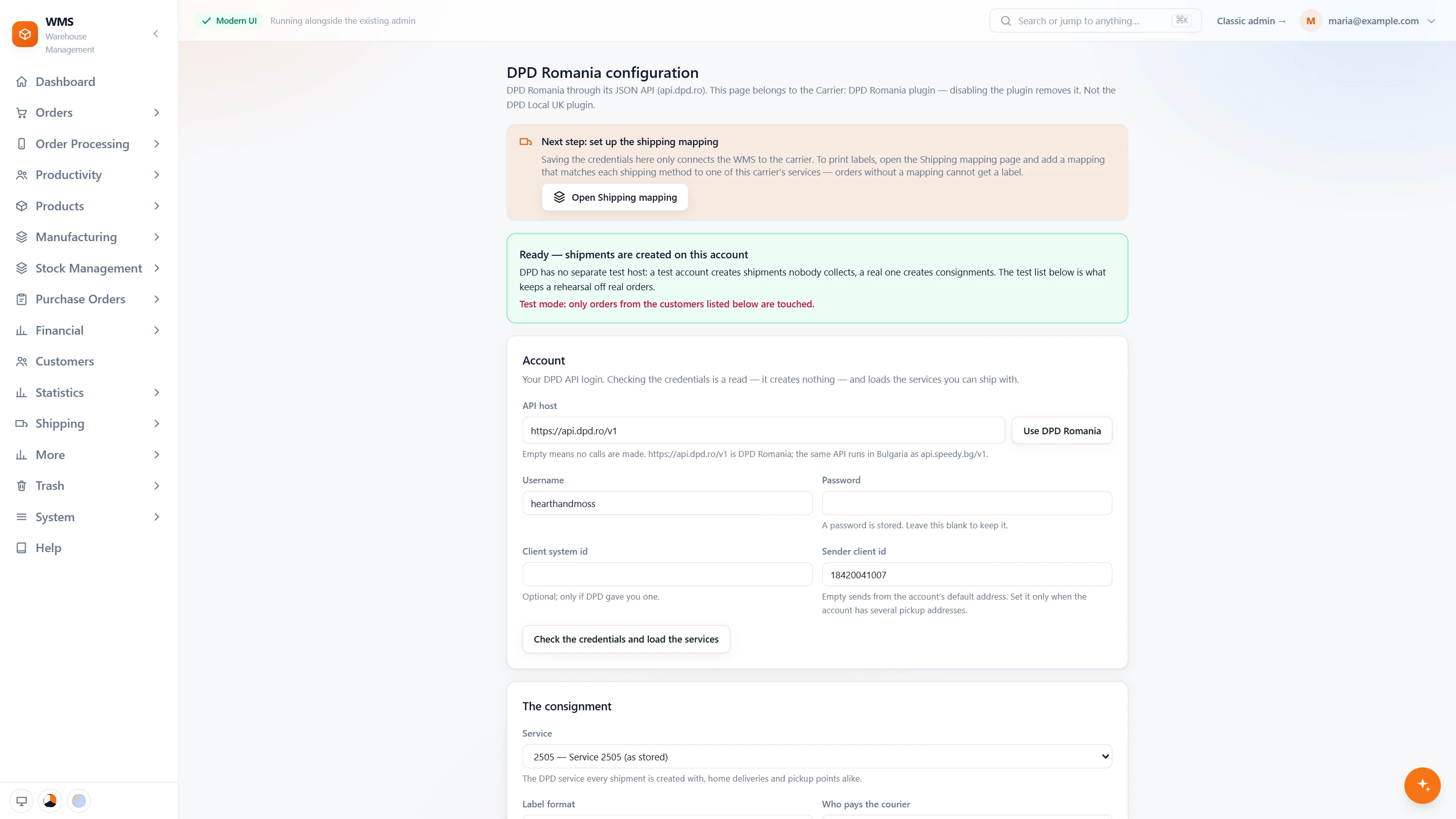
Connect your DPD Romania account
- Your own accountYour DPD username and password; the password is never shown again, only whether one is stored.
- Check and load the servicesOne click checks the login and lists the services you can ship with. Nothing is created.
- Several pickup addressesSet the sender client id when your account has more than one; empty sends from the default address.
- The consignmentThe service for every shipment, who pays, sender or recipient, and the label: A6, A4, or four A6 on one A4 sheet.
- Then the shipping mappingThe page reminds you of the last step: link each shipping method of your shop to a DPD service.
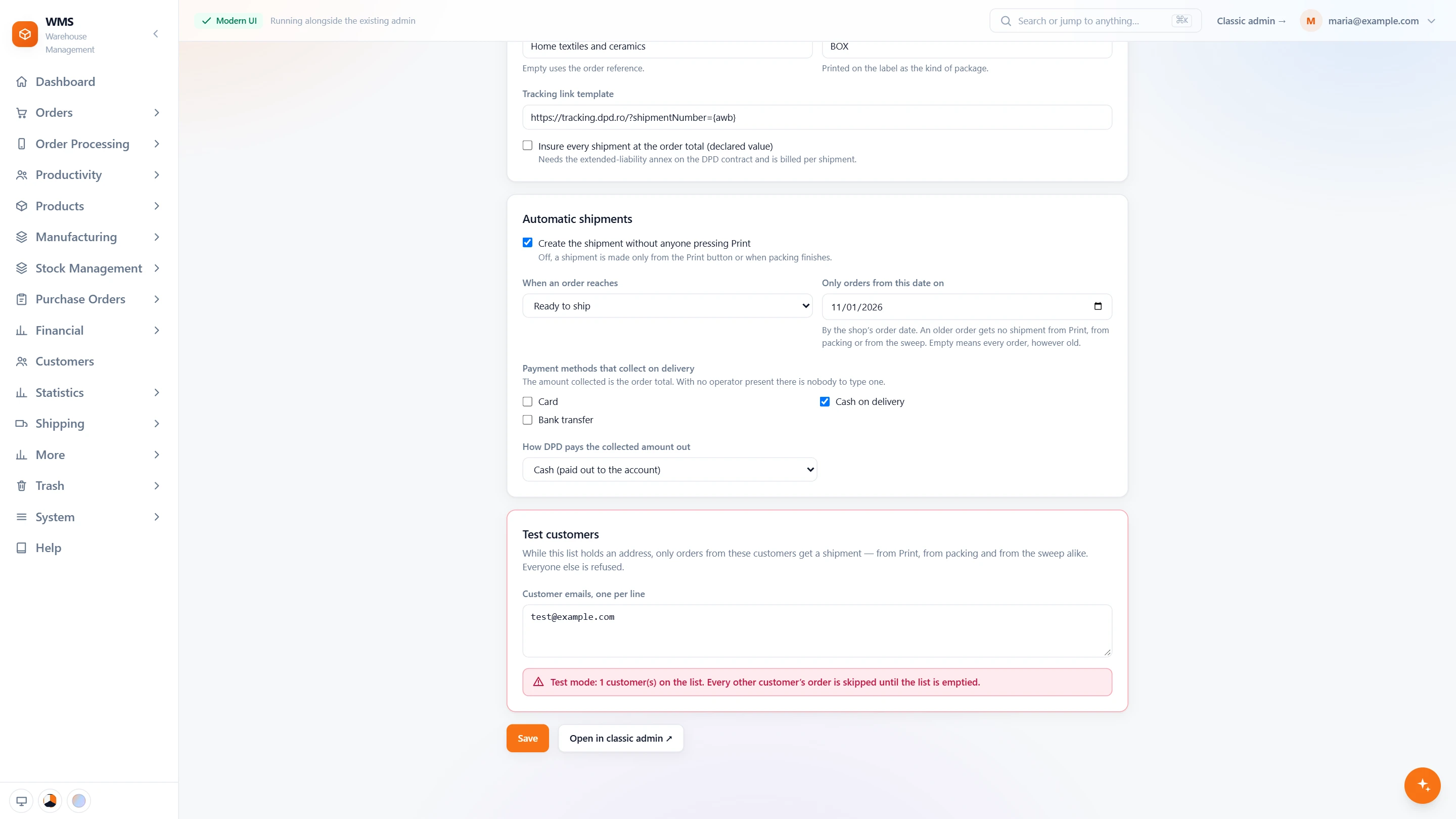
Shipments without anyone pressing Print
- Package and trackingA default package printed on the label, the parcel contents and the link to DPD's tracking page.
- Declared valueTick it, and every shipment is insured at the order total; it needs that annex on your DPD contract.
- At the status you chooseSwitch it on, pick an order status, and the shipment is created for every order that reaches it.
- Cash on delivery, tickedTick the payment methods that mean cash on delivery, and choose cash or a postal money transfer for the payout.
- Only orders from a date onOlder orders never get a shipment, whichever way it is asked for.
- Test customersDPD has no separate test host, so while the list holds an address only those customers' orders get a shipment.
In daily shipping
- Three ways to a shipmentPrint from the orders list or the picking list, when packing finishes, or automatically at a status.
- Pickup points and lockersThe DPD Pickup point or locker the customer picked in your shop goes onto the shipment.
- One or several parcelsA shipment can carry several parcels, with the cash on delivery already on it.
- Cancel and trackCancel a shipment from the orders list, and keep the tracking link on the order.
- Not DPD LocalThis is for DPD Romania accounts; DPD Local in the UK is a separate integration.
From a new order to a parcel with DPD Romania
- 01The order arrivesFrom your shop or marketplace, with the delivery option and any Pickup point or locker the customer chose.
- 02Picked by scanA picking list sorted by rack and bin leads your team through the warehouse, and every item is scanned.
- 03Packed and checkedEach item is scanned again at the packing table, so the box holds exactly what was ordered.
- 04Shipment and labelPulsa creates the DPD shipment with the parcels, the cash on delivery and the point, and the label prints.
- 05Handed to DPDThe parcel waits for the courier, and the shipment stays on the order in Pulsa.
What moves between DPD Romania and your warehouse
Setting up DPD Romania with Pulsa
- 01Your DPD Romania account
Add your DPD Romania credentials and choose your service.
- 02Delivery options mapped
Each delivery option in your shops gets its DPD service, Pickup points and lockers included.
- 03Rehearsed first
DPD provides test accounts on request; a test list of customer emails and a start date keep the rehearsal away from real orders.
- 04Automatic, if you want it
Choose the status that creates the shipment by itself; it starts switched off.
- A DPD Romania business account with API access
- A label printer for A6, or plain A4 paper
We set it up with you during onboarding, and every connection starts switched off until it has been tested.





Questions about DPD Romania
What does the DPD Romania integration do?
It creates DPD Romania shipments from your orders in Pulsa, for one or several parcels, with cash on delivery and Pickup point or locker deliveries, and prints the label. A shipment can also be cancelled from the orders list.
Can customers pick up from a locker?
Yes. The DPD Pickup point or locker the customer picks in your shop goes onto the shipment.
Which label sizes can I print?
A6 thermal labels, A4, or four A6 labels on one A4 sheet.
Can I test it before real orders go out?
Yes. DPD provides test accounts on request, and a test list of customer emails and a start date limit the first real shipments to the orders you pick.
Is this the same as DPD Local in the UK?
No. DPD Romania uses its own system; DPD Local is a separate integration.
Can I ship with DPD and other couriers?
Yes. Each delivery option in your shops is mapped to a courier service, so DPD can carry some orders while another courier connected to Pulsa carries others.